Payments & refunds
Avero processes card payments through Stripe Connect, so tasting-room, storefront, club, and event sales settle into one account. This page covers where the money lives — the Financials report, payouts, reconciliation, refunds, saved cards, and cash.
For actually charging a guest (card reader, cash, gift cards, payment links), see Settle a check & take payment.
Who can use it
- Financials —
stripe.financials.read: Manager, Admin. - Payment reconciliation & error triage —
reports.payment_reconciliation: Manager, Admin. - Issue a refund on an order —
orders.refund: Manager, Admin. - Cancel an order —
orders.cancel: Manager, Admin. - Cards on file —
guest.card_methods.readto view,guest.add_cardto capture: every role except Viewer. - Cash drawers — the
cash_drawer.*set: Manager, Admin. Concierge can open, close, drop and view, but not pay out or refund.
Financials
/admin/financials (Financials — "Stripe Connect financial
reporting"; the same page answers at /financials and
/reports/financials) is the money dashboard. Pick a date range
(today, last 7 days, this month, last month, or custom) and read four
tiles:
- Gross Volume — with charge count and Stripe fees.
- Net Volume — "After Stripe fees".
- Refunds — amount and count.
- Payouts — what Stripe has sent to your bank.
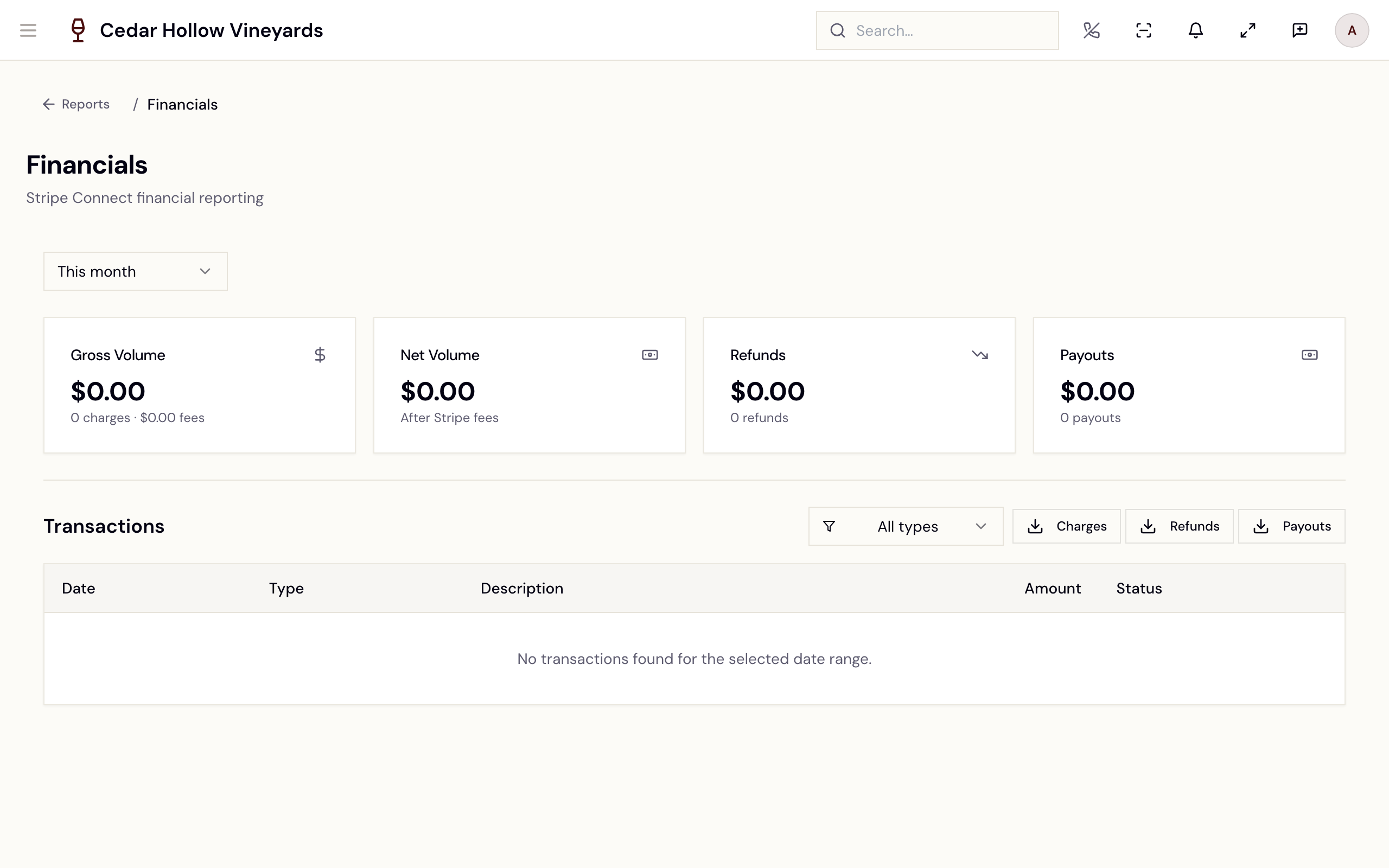
Financials — gross and net volume, refunds, payouts, and transactions.
Below, Transactions lists every Stripe event — filter by All types, Charges, Refunds, Disputes, or Payouts, page with Load more, and export any of the three CSVs: Charges, Refunds, Payouts. The page is read-only reporting; refunds are issued from the surfaces below, and the Stripe dashboard itself opens from Open in Stripe on the Stripe integration page.
Reconciliation
Two reports keep the books honest — both documented in Reports & KPIs:
- Payment Reconciliation (
/reports/payment-reconciliation) ties Avero's settled tenders to Stripe's ledger and payouts, exception by exception. Its footer states the contract: "Numbers reconcile to /reports/financials." - Payment error triage (
/reports/payment-errors) queues every failed payment — declines first — with Resolve / Ignore actions.
Refunds
Refunds are issued where the sale lives, not from Financials:
- Storefront, club, phone, and POS-born orders — Issue Refund on
the order's Payment card at
/admin/orders/:id. Stripe-processed orders refund automatically — "This refund will be processed automatically through Stripe." — others are recorded as manual refund requests. The most you can refund this way is the Refundable amount less any gift card value on the order: "Refund it card by card under Gift cards; only what is unspent goes back." The order's Gift cards card has Refund unspent balance for each card. See Orders & fulfillment. - Event tickets — the refund reconciliation queue at
/admin/events/refunds(Events). - Wine-club release charges — the release's reconciliation page at
/admin/wine-club/releases/:id/reconciliation(Releases & shipments). - Cash refunds at the drawer need
cash_drawer.refund(Manager, Admin).
Every refund then shows up in Financials (the Refunds tile and transaction rows), in the Daily Sales Summary's Refunds section, and in the Refund Rate KPI (Reports & KPIs).
Cancelling a paid order
Cancel Order on the order page (orders.cancel) asks for a reason and
also returns the money, for web orders as well as register ones. The message
afterwards tells you how the refund went:
- "Order canceled" — "$X is going back to the original payment." This also appears when the refund was recorded for you to pay back by hand (cash, or a Manual Action refund), so check the refund history.
- "Order canceled" — "Nothing had been paid, so there was nothing to refund."
- "Order canceled, but the refund failed" — the order is cancelled and the guest has not been paid back. Check Refund History on the Payment card before refunding again; a refund left pending may still go through.
An order that sold gift cards can only be cancelled while every card is untouched. Once one has been used or refunded, Avero refuses and asks you to refund what is left on each card instead.
What a refund does to the order
A refunded order no longer reports itself as fully paid. Order payment status runs open → paid → partially_refunded → refunded, alongside canceled:
- Refund part of an order and it becomes partially refunded — it is no longer counted as a clean paid sale, but still carries the amount it kept.
- Refund all of it and it becomes refunded.
This matters for reconciliation: an order sitting at partially refunded is the normal, correct state after a partial return, not a stuck payment.
Tax on a refund
A refund records how much of itself was tax, so refunded tax stops counting as collected. The share is prorated against the amount the guest paid — the sale total plus any tip, not the subtotal, so shipping and discounts are all in the denominator — and a full refund returns all of the tax. A tip is handed back in the same proportion. Where a tax provider is connected, the refund is reported back to it as well.
Anything refunding 99% or more of the amount the guest paid is treated as a full refund and returns 100% of the tax. That is intentional — it absorbs the rounding on a genuine full refund — but it does mean a true 99% partial over-returns roughly 1% of tax. The figures QBO has already reported depend on this, so changing it is a finance decision rather than a correction.
Card on file
A guest's saved card shows on their CRM profile as a brand-plus-last-four badge (amber when it expires soon) and can be captured during intake, reception check-in, or POS checkout. Cards are stored in Stripe — Avero never holds the number — and can be charged for guest-account payments, pickups, and club renewals. See Guests & CRM.
Cash
Reconcile drawers at /operations/cash-drawer — open with a float,
drop, pay out, and close with a count. The daily cash report lives there
too. See Daily operations.
Payment policies
Deposit rules and other payment behavior are configured under Settings →
Your business → Policies (Payment Policy) at /admin/company — see
Settings.
Reference
| Control | Where | What it does |
|---|---|---|
| Charges / Refunds / Payouts | Financials → Transactions | Exports that transaction type as CSV. |
| Load more | Financials → Transactions | Pages further back through Stripe events. |
| Issue Refund | Order detail → Payment card | Refunds the order, less gift card value. |
| Cancel Order | Order detail | Cancels the order and returns the money. |
| Resolve / Ignore | Payment error triage | Closes out a failed payment. |
| Open in Stripe | /admin/integrations/stripe | Opens your hosted Stripe dashboard. |
Troubleshooting
- "Failed to load financial summary. Please try refreshing the page." — a transient Stripe fetch failure; refresh.
- "No transactions found for the selected date range." — widen the range; payouts especially arrive on a delay.
- Numbers don't match Stripe — run Payment Reconciliation for the same window and check its Exceptions table.
- A refund attempt shows "Manual Action" — the payment wasn't Stripe-processed. Avero has only recorded the request; issue the refund in your own payment system.
- "Payments are currently blocked" on the Stripe page — finish
onboarding: Resume Onboarding at
/admin/integrations/stripe.
Related
- Settle a check & take payment — the register side of the same money.
- Reports & KPIs — reconciliation, error triage, and the daily sales breakdown.
- Integrations — Stripe Connect setup and status.
- Orders & fulfillment — order-level refunds and returns.