Reports & KPIs
Reports (/reports — "Compliance filings, financial data, and
business reports") is the index for every report in Avero. Two more
analytical surfaces live under Admin: the KPI Catalog at
/admin/kpis and Raw Data Export at /admin/data-export.
Who can use it
Each report is gated by its own permission, and the index only shows the cards you can open. If you hold none of them, the page says so plainly: "You don't have permission to view any reports. Please contact your administrator."
| Report | Permission | Who has it |
|---|---|---|
| Daily Sales Summary | reports.daily_sales | Manager, Admin |
| Payment Reconciliation and Error Triage | reports.payment_reconciliation | Manager, Admin |
| Wholesale Orders | reports.wholesale | Manager, Admin |
| Compliance reports (filing, events, history) | company.read | Manager, Concierge, Admin |
| Financials | stripe.financials.read | Manager, Admin |
| KPI Catalog | reports.kpi.read | Admin only |
| Raw Data Export | reports.export.run (reports.export.pii for clear-text PII) | Admin only |
| Audit Log | audit.read | Admin only |
The reports index
The index groups its cards into four sections — Compliance Reports, Financial Reports, Operations & Sales, and Administration:
| Card | Where | What it covers (card copy) |
|---|---|---|
| TX Winery Filing | /reports/filing | "Generate and view TABC Winery Permit (G) compliance filings for locked periods." |
| Event Detail | /reports/events | "Browse and export individual compliance events with filtering and search." |
| Filing History | /reports/history | "Review previously locked filing periods with snapshots and audit trails." |
| Financials | /reports/financials | "View Stripe payment volume, transactions, refunds, payouts, and export financial data." |
| Daily Sales Summary | /reports/daily-sales | "End-of-day sales by tender, top items, top servers, voids, comps, and refunds for any date." |
| Payment Reconciliation | /reports/payment-reconciliation | "Reconcile internal payment tenders against Stripe ledger events and surface exceptions." |
| Payment Error Triage | /reports/payment-errors | "Filter and resolve failed payments across POS, deposits, gift cards and online — guest-fixable declines first." |
| Wholesale Orders | /reports/wholesale-orders | "Open and recent wholesale orders grouped by customer with outstanding balances and CSV export." |
| Audit Log | /admin/audit | "Browse, filter, and export sensitive-action audit events for your company." |
The Financials card opens the same page documented in
Payments & refunds — one page,
reachable at /reports/financials, /financials, and
/admin/financials.
The printable run-sheet (/operations/daily-sheet) and cash-drawer
counts (/operations/cash-drawer) are Operations pages, not reports —
see Daily operations.
Daily Sales Summary
/reports/daily-sales (Daily Sales Summary) is the end-of-day
picture for one date. Filter by Date (UTC), Brand (All
brands), and Location (All locations — the list narrows to the
chosen brand), then Refresh.
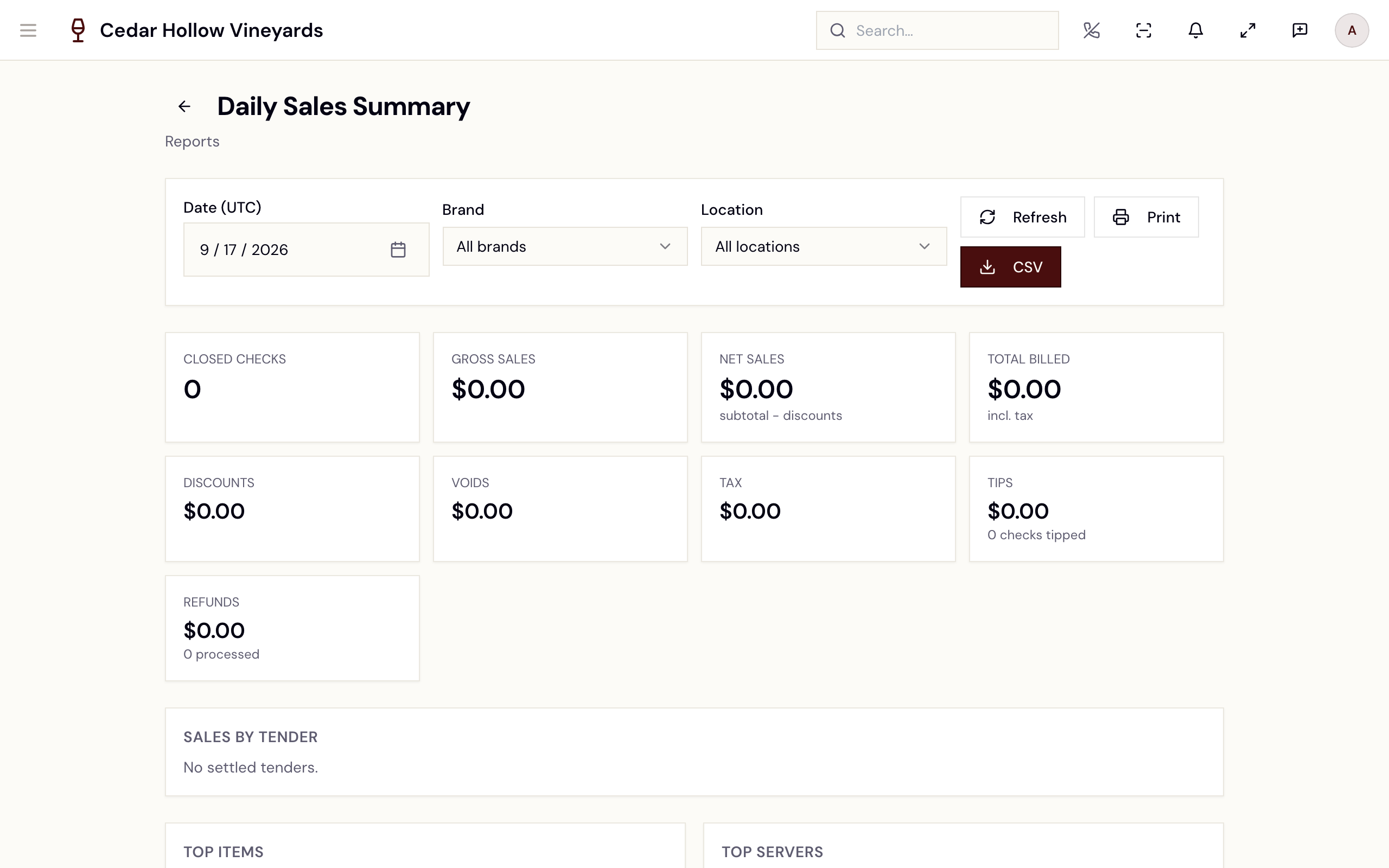
The Daily Sales Summary — KPI tiles, sales by tender, top items and servers.
The KPI tiles are Closed Checks, Gross Sales, Net Sales ("subtotal − discounts"), Total Billed ("incl. tax"), Discounts, Voids, Tax, Tips, and Refunds. Below them:
- Sales by Tender — settled tenders with count and amount.
- Top Items — item, quantity, gross.
- Top Servers — user, checks, net sales.
- Voids, Comps, and Refunds — each line with its reason, program, or status.
This report has the fullest set of output actions: Print opens a printable HTML view, and CSV downloads the day's summary.
Payment Reconciliation
/reports/payment-reconciliation (Payment Reconciliation) proves
that what Avero recorded matches what Stripe paid out. Set a From /
To range and read the Reconciliation Status card — when everything
ties out, the badge reads Reconciled; otherwise it counts payouts
against pending items. The status tiles are Payout Net, Stripe
Charges, Internal Stripe Tenders, and Δ Discrepancy ("internal
− stripe").
The tables below break the window down: Exceptions, Payouts (each row deep-links to the payout in the Stripe dashboard), Pending Payouts, Pending Payment Links, Internal Tenders (settled), Stripe Ledger, and Reconciliation Worker Outcomes. CSV exports the summary. The report's own footer states the contract: "Numbers reconcile to /reports/financials."
A Platform mode switch exists for Avero platform operators
(platform.reconciliation.read); winery staff stay in tenant view — if
you flip it without the permission you'll see "You do not have permission
to view platform-mode reconciliation." and a Switch to tenant view
button.
Payment error triage
/reports/payment-errors (Payment error triage) is the fix-it
queue for failed payments. Four summary tiles bucket the problems —
Guest-fixable, Retry, Needs action, Setup — and the list
filters by date range, Status (Open / Resolved / Ignored /
All) and Group (declines, outages, setup, shipping, and more).
Sort: Easy first floats guest-fixable declines to the top; Sort:
Recent is chronological.
Work a row with Resolve or Ignore; rows tied to another surface show a View → link instead. A clean window reads "No payment errors in this window." There is no export on this page.
Wholesale Orders
/reports/wholesale-orders (Wholesale Orders — "Wholesale
orders grouped by customer with outstanding balances.") filters by
From / To, Status (Pending through Cancelled), and a
Customer search ("Search name or email"). Tiles: Customers,
Orders, Total Volume, Outstanding Balance. Each customer
expands into its orders — order #, status, placed, expected ship, items,
total, outstanding. Export CSV downloads the filtered set.
Compliance reports
Three pages cover TABC compliance for Texas wineries:
- TX Winery Filing (
/reports/filing) — pick a Permit and a Locked Period to render the filing: the schedule of sales in gallons (onsite/offsite by class), certification, and audit hash. Download as PDF, CSV, or JSON. No locked period yet? "No locked periods available for this permit. Lock a period in Admin to generate reports." The page also shows a Tax Summary — Current Month widget (Tax Collected, Active Nexus States, Jurisdictions) with a View Full Report link to/admin/tax— see Settings. - Event Detail (
/reports/events) — every individual compliance event, filterable by date, Channel (Onsite / Offsite), Type (Onsite Sale / Offsite Sale / Reversal), location, and search. Export CSV or JSON. - Filing History (
/reports/history) — the locked periods for a permit with gallons and hash; per-row actions view the filing or download its PDF.
If the filing page warns "Company identity information is incomplete.
Update your company settings before filing.", finish the Corporate tab at
/admin/company first — see Settings.
The KPI Catalog
/admin/kpis (KPI Catalog — "Canonical metrics across Revenue,
Wine Club, POS, Inventory, and Compliance. Values are cached for one hour
and recomputed on demand.") is the admin's metric library. Tabs split the
catalog by domain — All, Revenue, Wine Club, POS /
Hospitality, Inventory, Compliance — with metrics such as
Gross Merchandise Value (GMV), Refund Rate, Active Club
Members, Wine Club MRR, Average Check Size, Covers (Guests
Served), On-Hand Inventory Value, and Tax Owed. AI Sommelier
metrics (such as Daily Active Chats) have no tab of their own; they
are listed under All.
Revenue counts money that was actually collected
Revenue figures — the wholesale revenue share and the channel mix among them — count only orders where payment was taken. An order counts once it is paid, and it keeps counting if it is later partially refunded or refunded, because the money genuinely was collected. Orders still open, or canceled, are not revenue and are left out.
Two consequences worth knowing:
-
These numbers stepped down when the rule landed. Revenue reports previously summed orders regardless of whether anything had been collected, so unpaid and canceled orders were inflating them. The lower figure is the corrected one — nothing was lost.
-
"Collected" is not the same as "kept." A refunded order still counts as collected revenue here. Metrics that are meant to be net of refunds say so explicitly — Lifetime Value is money collected net of refunds (see Guests & CRM) — and the Refund Rate KPI is where the giving-back shows up.
Refunds issued through Payments → refund on a payment link were missing from both the Net Revenue and Refund Rate KPIs until this was corrected: the filter named a refund state that is never recorded, so those refunds matched nothing. Net Revenue is now lower and Refund Rate higher by the value of those refunds. Both are the corrected figures.
The Sales Goal basis on the Daily Sheet is net of refunds too, and attributes each refund to the day it was issued rather than the day of the sale it reverses (see Daily operations).
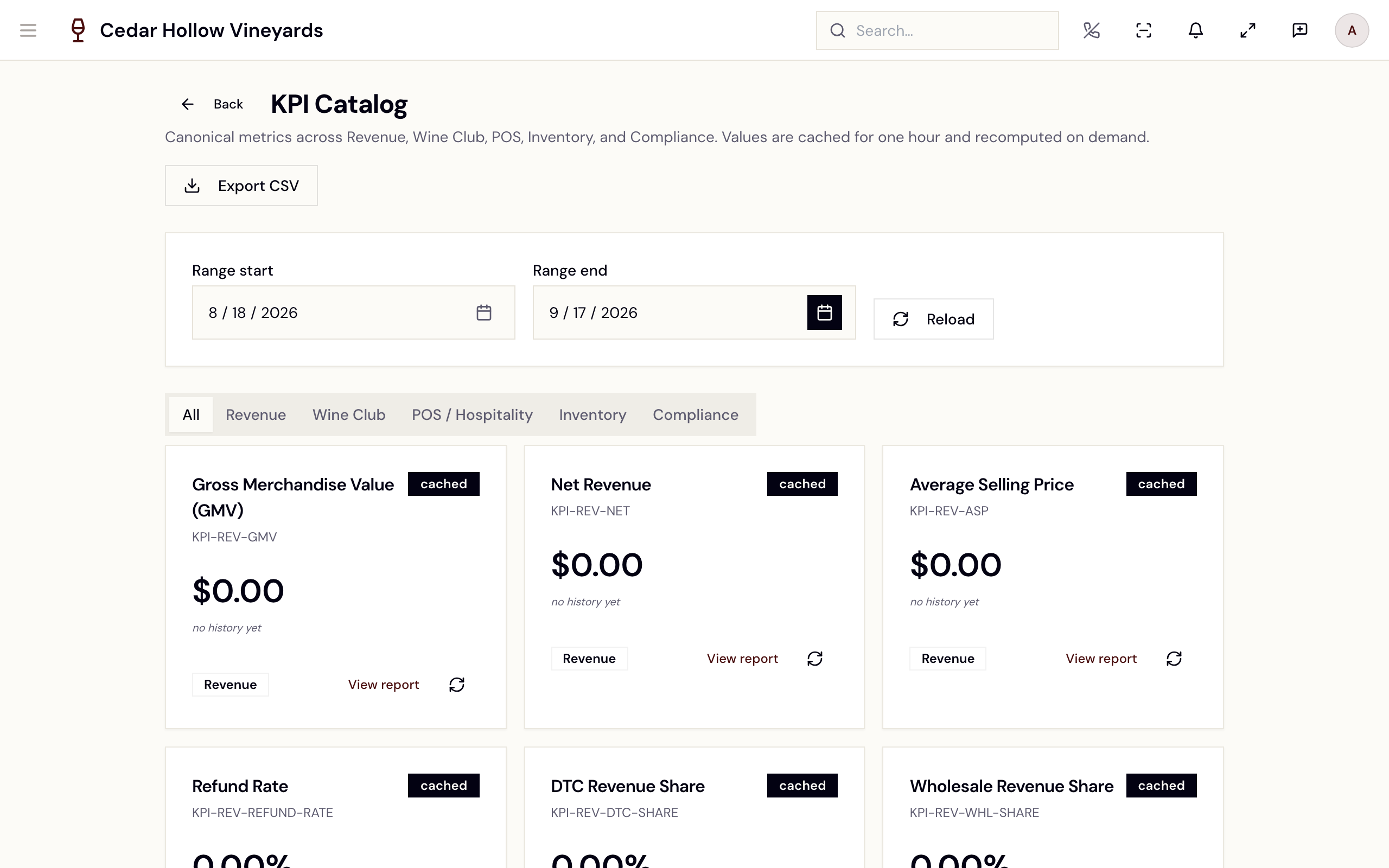
The KPI Catalog — domain tabs and per-KPI cards with sparklines.
Each card shows the value for the chosen Range start / Range end
(default: the last 30 days), a cached / fresh badge, a sparkline,
and a per-card refresh button. Revenue and POS / Hospitality cards carry a
View report link to /reports, and Inventory cards one to
/admin/inventory. Reload refreshes the page's values and Export CSV
downloads a snapshot of every KPI in range.
There isn't a standalone inventory report page — on-hand value is the
On-Hand Inventory Value KPI here, and live stock levels are at
/admin/inventory
(Products & inventory).
Raw Data Export
/admin/data-export (Raw Data Export — "Stream tenant-scoped
data to CSV. PII fields are hashed by default and the download is gated by
a per-tenant signed URL that expires in 7 days.") is the bulk pipe for
analysts:
- In New export, tick the Tables you need — tables carrying personal data are marked contains PII.
- Optionally bound the job with Start date (optional) / End date (optional).
- Pick the Format — CSV today (Parquet (coming soon) is not yet selectable).
- Enqueue export. The job appears under Recent exports as Queued → Running → Ready (or Failed / Expired), with a Download link and row/byte counts when ready.
When a PII table is selected the page warns: "By default, email and phone
are SHA-256 hashed and addresses are coarsened to city + state + postal.
To export plain values you must hold the reports.export.pii
permission." Ticking Export PII in clear-text (audited) writes an
audit event.
Reference
| Control | Where | What it does |
|---|---|---|
| Daily Sales Summary | Opens the printable HTML day view. | |
| CSV | Daily Sales, Payment Reconciliation, Event Detail | Downloads the current view as CSV. |
| Export CSV | Wholesale Orders, KPI Catalog | Downloads the filtered orders / the KPI snapshot. |
| PDF / CSV / JSON | TX Winery Filing | Downloads the locked filing in each format. |
| Resolve / Ignore | Payment error triage row | Closes out a failed-payment task. |
| Reload | KPI Catalog | Recomputes the visible KPI values. |
| Enqueue export | Raw Data Export | Queues a bulk table export with a 7-day download link. |
Troubleshooting
- "You don't have permission to view any reports. Please contact your administrator." — your role holds none of the report permissions; reports are Manager/Admin surfaces (see the table above).
- "Failed to load daily sales summary." — refresh; if it persists, check the date and location filters.
- "No payouts in this window." — widen the reconciliation date range; Stripe payouts land on a delay.
- "Company identity information is incomplete. Update your company
settings before filing." — complete legal name and address on the
Corporate tab of
/admin/company. - "No locked filings found for this permit. Lock a filing period in Admin to create history." — periods must be locked before history or filings render.
- A KPI card reads "Adapter failed:" — that metric's computation errored; use the per-card refresh, then Reload.
- An export sits at "Failed" — the row shows the error message; re-enqueue with a narrower date range.
Related
- Payments & refunds — the Financials page, payouts, and where refunds live.
- Daily operations — the day-of Daily Sheet and cash drawers.
- Settings — the tax dashboard, audit log, and company identity the filings depend on.