Set up your wine club
Wine club administration lives at /admin/wine-club — Wine Club,
"Manage memberships, club catalog, and releases." Four tabs:
Memberships, Clubs, Club Releases (covered in
Releases & shipments), and Audit. A
Brand filter on the right scopes everything when you run more than one
brand. The tasting-room side — pickups, arrivals, lookups, and signups —
lives at /wine-club.
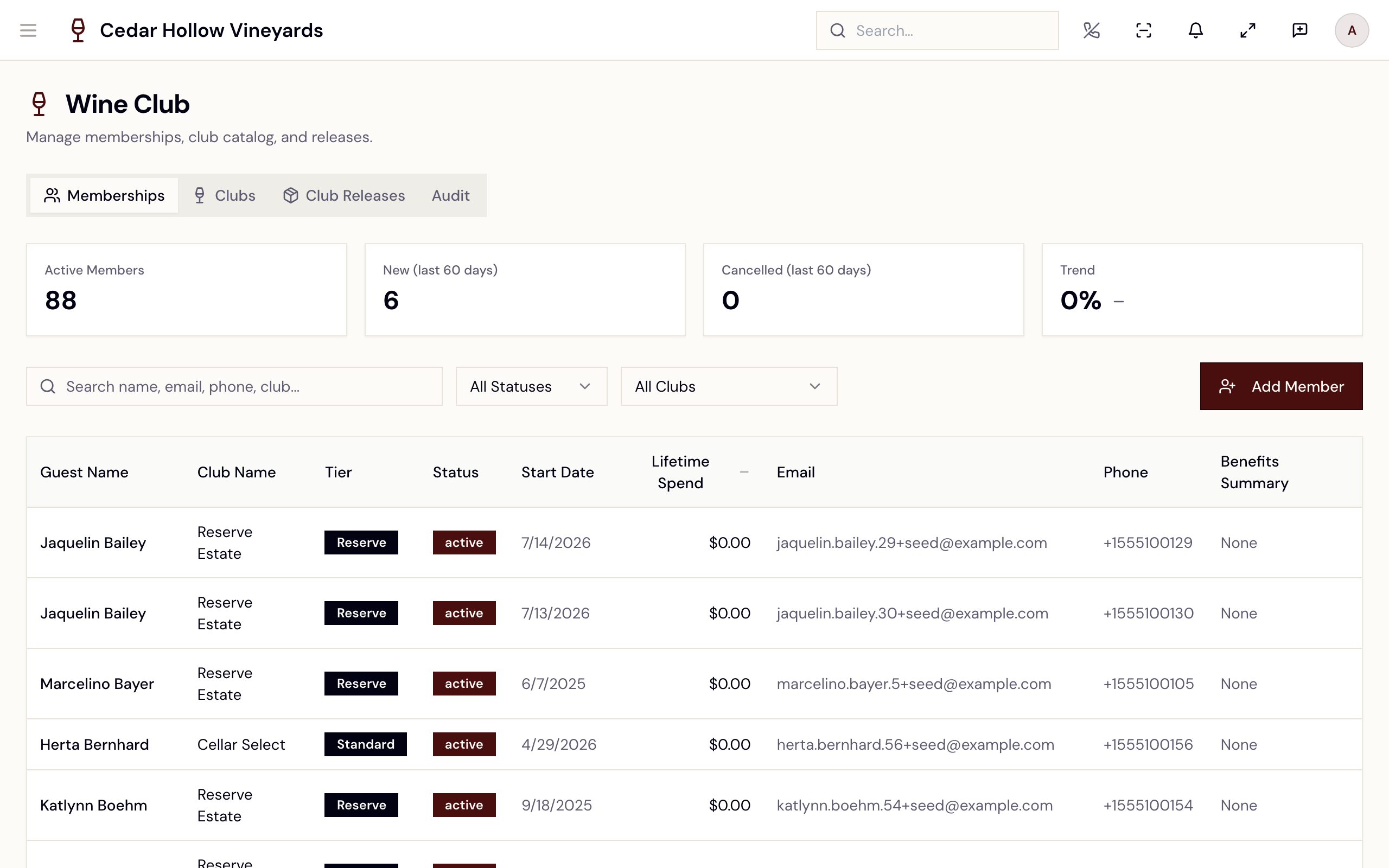
The Wine Club admin — the Memberships, Clubs, Club Releases, and Audit tabs.
Who can use it
- See the dashboard —
wineclub.read. Managers, Concierges, Ambassadors, Servers, Wine Associates, and Viewers all have it; without it the page says "You do not have permission to view Wine Club." - Create clubs, enroll members, and run lifecycle actions —
wineclub.update: Managers, Ambassadors, and Wine Associates (and Admins). Buttons stay visible but disabled with the tooltip "You need wineclub.update to manage memberships". - Open a member's detail drawer —
wineclub.member.read_detail: Managers, Concierges, and Ambassadors. - Add member notes —
guests.update("You need guests.update to add notes"). - Edit the dunning policy —
policies.update(Admins and Managers).
Create a club
On the Clubs tab ("Club definitions and configurations. Click Edit to
open the full builder."), tap Create Club. The Create New Club
dialog asks for one thing — Club Name (identifier) ("Used as a unique
key. Cannot be changed later.") — then Create & Open Builder drops you
into the club builder at /admin/wine-club/definitions/:id/builder.
The club builder
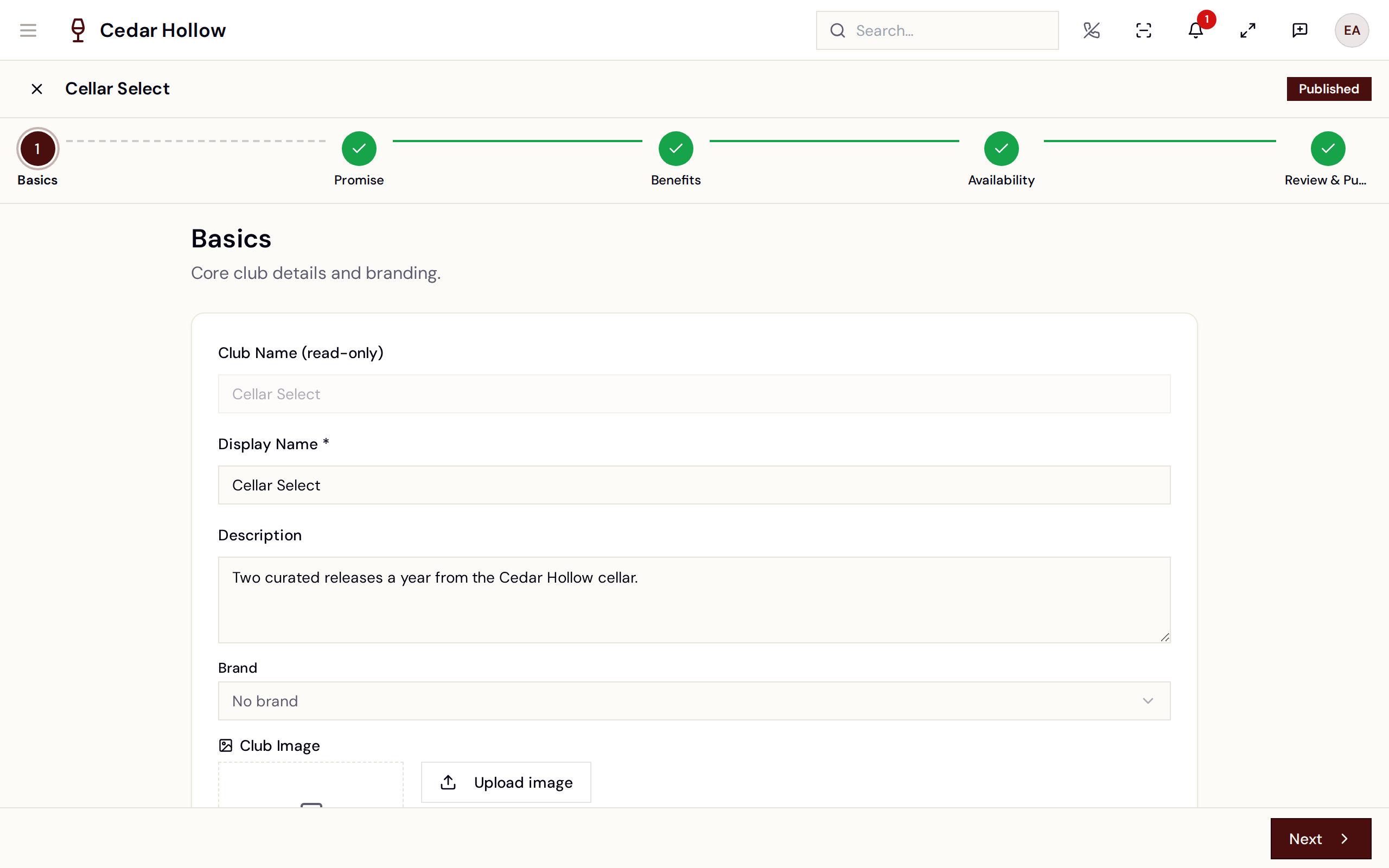
The club builder — five steps, autosaved; finish with Save & Close.
Five steps, autosaved as you go (Save & Close exits — "Changes saved"):
- Basics — "Core club details and branding." Display Name (required), Description, Brand, and a 16:9 Club Image.
- Promise — "What members receive with each shipment." Bottles per Release, Shipments per Year, Release Months (month toggles — leave them empty and "release scheduler will skip this club"), Discount Percent, and First Shipment Price — "The fixed amount charged when a member joins online." Until it's set, the storefront shows "Contact the winery to join."
- Benefits — "List what members get and (optionally) what is excluded from the discount." Marketing bullets (Add Benefit) plus discount rules: an Allow-only mode toggle and chip editors for Product types, Collection IDs, Product IDs, and Tags.
- Availability — "Control where and how this club is available." Switches for Available in Admin, Available on Web, Shipping Allowed, Pickup Allowed, and Allow Cancel Online, plus Sales Channels (Ambassador, Concierge, Web, Store / Internal).
- Review & Publish — a Readiness Checklist ("Display name set", "Bottle quantity set", "Shipments per year set", "Release months set" — each with a Fix → shortcut), membership counts, and the Publish button ("Club published"). Until every required field is set: "Complete the required fields above to enable publishing."
Back on the Clubs tab, each club row shows Published / Draft / Archived and Available / Hidden badges, with Edit, Publish, Archive, and Delete actions as its state allows.
Archive Club — "Archiving this club will hide it from POS enrollment. Existing memberships will not be affected." Deleting is only possible for draft or archived clubs ("Published clubs must be archived first.").
Tiers
Tiers live in the Tier catalog, inside the club's expanded row on the Clubs tab — "Members and releases can only use tiers defined here. Order controls how tiers appear in pickers." Add tiers with a name (e.g. Reserve), First-ship $, and Bottles, or Seed from existing to build the catalog from tiers already on your members. Columns: Order, Tier name, First-ship $, Bottles, Web join, Join payment.
Manage members
The Memberships tab keeps score — Active Members, New (last 60 days), Cancelled (last 60 days), and a Trend — over a searchable table ("Search name, email, phone, club...") filtered by status (Active / Paused / Cancelled / Inactive) and club. Columns run from Guest Name and Club Name through Tier, Status, Start Date, Lifetime Spend, and Benefits Summary.
The member drawer
Selecting a member opens the detail drawer: the member's status badge, metric tiles (Lifetime Spend, Shipments, Member Since, Successful Charges, Failed Charges, Pending Charges), and three tabs — Profile, Timeline, Tier History.
The member drawer — status, charge metrics, and the lifecycle action row.
The header actions cover the whole lifecycle (all but notes need
wineclub.update):
| Action | When it shows | What it does |
|---|---|---|
| Pause | Active members | "The member will be excluded from upcoming releases until you resume them" — optional Resume on date. Immediate; toast "Membership paused". |
| Resume | Paused members | Back to active — "Membership resumed". |
| Cancel | Not yet cancelled | "This will end the membership immediately. … This action is auditable but not reversible." Pick a Reason (Member request, Non-payment, Moved out of area, …). |
| Skip next release | No open skip | "The member will not be allocated to the next release. The skip is cleared automatically once that release executes" — or Clear skip by hand. |
| Change tier | Not cancelled | "The transition is recorded on the Tier History tab and is auditable." Requires a reason. |
| Add note | Always | Stored on the guest record, mirrored to the timeline; Staff only or Customer-visible. |
| Retry charge | Failed charges exist | Re-queues dunning — "Dunning re-queued", "N failed charge(s) reset to pending." |
A member with an open skip shows a banner: "This member will be skipped on the next release." Only one open skip can exist at a time ("An open skip already exists for this member").
Enroll members
- From admin — Add Member on the Memberships tab: "Select a club, then search for the guest you want to enroll." No guest yet? "Can't find them? Create new guest" captures first name plus an email or phone inline. Success: "Member enrolled".
- From the floor — the POS surface below.
The POS surface — /wine-club
The tasting-room Wine Club page has a New Member button and three tabs: Pickup Queue, Arrivals Today, and Member Lookup.
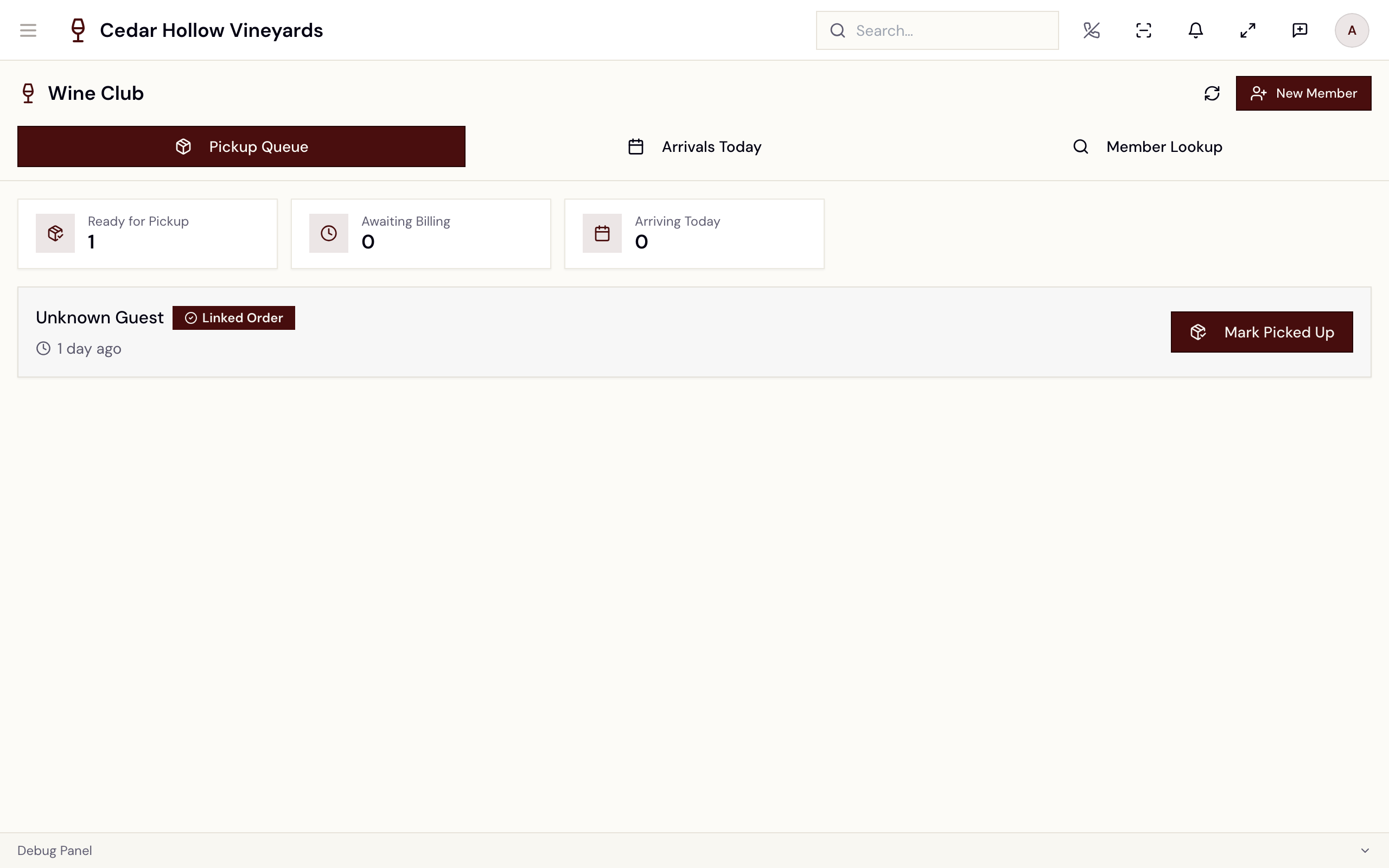
The POS Wine Club page — the Pickup Queue with its state pills and Mark Picked Up.
Pickup Queue
Every club shipment marked for pickup queues here, with KPIs (Ready for Pickup, Awaiting Billing, Billing Overdue, Arriving Today) and an Arriving Today section for members with a reservation. Each card carries a state pill:
| Pill | Meaning |
|---|---|
| Awaiting Billing | The charge hasn't run yet — "Processes on [date]". |
| Billing Overdue | The charge failed or is late; a Resolve button appears. |
| Order Not Imported | Billed externally but the order isn't linked yet. |
| Linked Order | Paid and linked — ready to hand over. |
| Needs Review | "Missing billing or order reference" — flag it for a manager. |
Mark Picked Up (enabled only when the shipment is ready) completes the handoff — "Pickup completed", "Shipment has been marked as picked up." The card also shows an ID/age-eligibility badge, the item count, and a View order sheet.
Resolve (on Billing Overdue) offers three recovery paths: Retry card on file ("Re-attempts the saved card immediately" — "Retry queued"), Send payment link ("Emails the member a hosted checkout link"), or Charge new card ("Process a new card on the Stripe terminal").
Arrivals Today and Member Lookup
Arrivals Today lists club members with reservations today — club and tier badges, party size, and a pickups badge when bottles are waiting. Member Lookup searches "Search by name, email, or phone..." (two characters minimum); each result card shows an Active / Inactive / Not a Member badge, the club, contact details, pending pickups, and — for non-members — a Sign Up button.
Sign up a member at the POS
New Member (or Sign Up on a lookup card) opens the Club Enrollment wizard — four steps: Guest, Club, Tier, Review — with an email-marketing opt-in on the way. Success: "Member signed up" — "[guest] has been added to [club]". If they already belong: "Already a member" — "This guest already has an active membership for this club."
Billing and dunning
Club charges run against the member's card on file on each release's Charge Date (see Releases & shipments for the release cycle and reconciliation). When a charge fails, dunning takes over: automatic retries on a backoff schedule, with member emails at each stage (first attempt, second attempt, and a final on-hold notice).
Out of the box: 4 total attempts (the original plus three retries), waiting 0 / 3 / 7 / 14 days between attempts, and on final failure the membership is paused (not cancelled).
Tune this at /admin/settings/wine-club/dunning — Dunning Policy,
"Tenant-wide rules for retrying failed wine-club charges and sending
dunning emails." (editing needs policies.update):
- Auto-retry — Run dunning automatically ("When off, failed charges stay in 'failed' until an operator acts.") and Max attempts (1–10, "Total charge attempts including the original.").
- Backoff schedule (days) — "Days to wait before each retry. The first value is the wait between attempt #1 (the original) and attempt #2."
- After all attempts fail — Final attempt action: Pause membership or Cancel membership ("Pause keeps the member but stops future charges and shipments. Cancel ends the membership outright.").
Save policy confirms with "Dunning policy saved".
Automatic retries are not the only lever. On the release's reconciliation page each failing member also has manual follow-up — Invoice the member for what they owe (the button reads Re-send once one has gone out, so you can see at a glance who has been billed), log a phone call, or send an SMS or email. A retry that finally succeeds settles the member's order and stops the dunning sequence, so nothing needs chasing afterwards. See Releases & shipments for the row-by-row workflow.
Reference
| Control | Where | What it does |
|---|---|---|
| Create Club | Clubs tab | Names a new club and opens the builder. |
| Publish / Archive | Clubs tab row | Makes a club enrollable / hides it from enrollment. |
| Tier catalog | Clubs tab, expanded row | Defines the tiers members and releases can use. |
| Add Member | Memberships tab | Enrolls an existing (or new) guest into a club. |
| Pause / Resume / Cancel | Member drawer | Lifecycle actions — pause is reversible, cancel is not. |
| Skip next release | Member drawer | One-release skip, cleared automatically after the release runs. |
| New Member | /wine-club header | The four-step POS enrollment wizard. |
| Mark Picked Up | /wine-club Pickup Queue | Completes a club shipment handed over at the tasting room. |
| Resolve | Billing Overdue pickup card | Retry card, send a payment link, or charge a new card. |
| Save policy | Dunning Policy settings page | Applies the tenant-wide retry schedule and final action. |
Troubleshooting
- "You do not have permission to view Wine Club." — you need
wineclub.read; ask an admin to check your role. - "Already a member" — "This guest already has an active membership for this club." — the signup wizard blocks duplicates; look the member up instead.
- "A customer with this email already exists. Search for them instead." — creating a guest inside Add Member hit a duplicate; switch back to search.
- "An open skip already exists for this member" — a member can hold only one open skip; Clear skip first if it's wrong.
- "Cannot pause a cancelled membership" / "Cannot resume a cancelled membership; create a new one instead" — cancellation is terminal; re-enroll the guest as a new member.
- "No tiers defined for this club yet. Add tiers in the club's Tier Catalog (Clubs tab) first." — the Change tier dialog needs a tier catalog before it can move anyone.
- Storefront shows "Contact the winery to join." — the club has no First Shipment Price; set it on the builder's Promise step.
- A club never appears in the release scheduler — check the Promise step's Release Months: "No months selected — release scheduler will skip this club."
Related
- Releases & shipments — build and charge a club release, reconcile payments, and ship.
- Guests & CRM — the guest profiles that memberships and notes attach to.
- Settle a check & take payment — the terminal used when charging a new card at pickup.