Guests & CRM
A guest is a customer profile in Avero's CRM. The database lives at
/admin/crm — the page is titled Customers ("Manage your guest
records and customer profiles.") — and every person opens into a 360
profile at /admin/crm/guests/:guestId: spend, club, orders,
reservations, communications, and eligibility in one place. (You'll see
"customer" in titles and buttons and "guest" nearly everywhere else — they
mean the same record.)
Who can use it
- Browse and search —
guests.read/guests.search: every role can search guests; the CRM list itself is a back-office surface. - Create —
guests.create: all front-of-house roles except Viewer. - Edit profiles (notes, preferences, addresses, ID scan) —
guests.update: most roles; without it the profile shows a Read Only badge. - Delete —
guests.delete, and Export PII Data —privacy.pii.export: Manager/Admin territory (PII export is Admin-only). - Card on file —
guest.add_cardto save or manage cards.
The customer database
/admin/crm lists everyone. Search by "Search by name, email, or
phone..."; switch between list and card views. When you have guests, a
KPI strip across the top doubles as a filter — click New (30d),
Trending Up, or Trending Down to filter the list (a "Filtered:"
chip with Clear appears); Avg Lifetime shows average lifetime
spend.
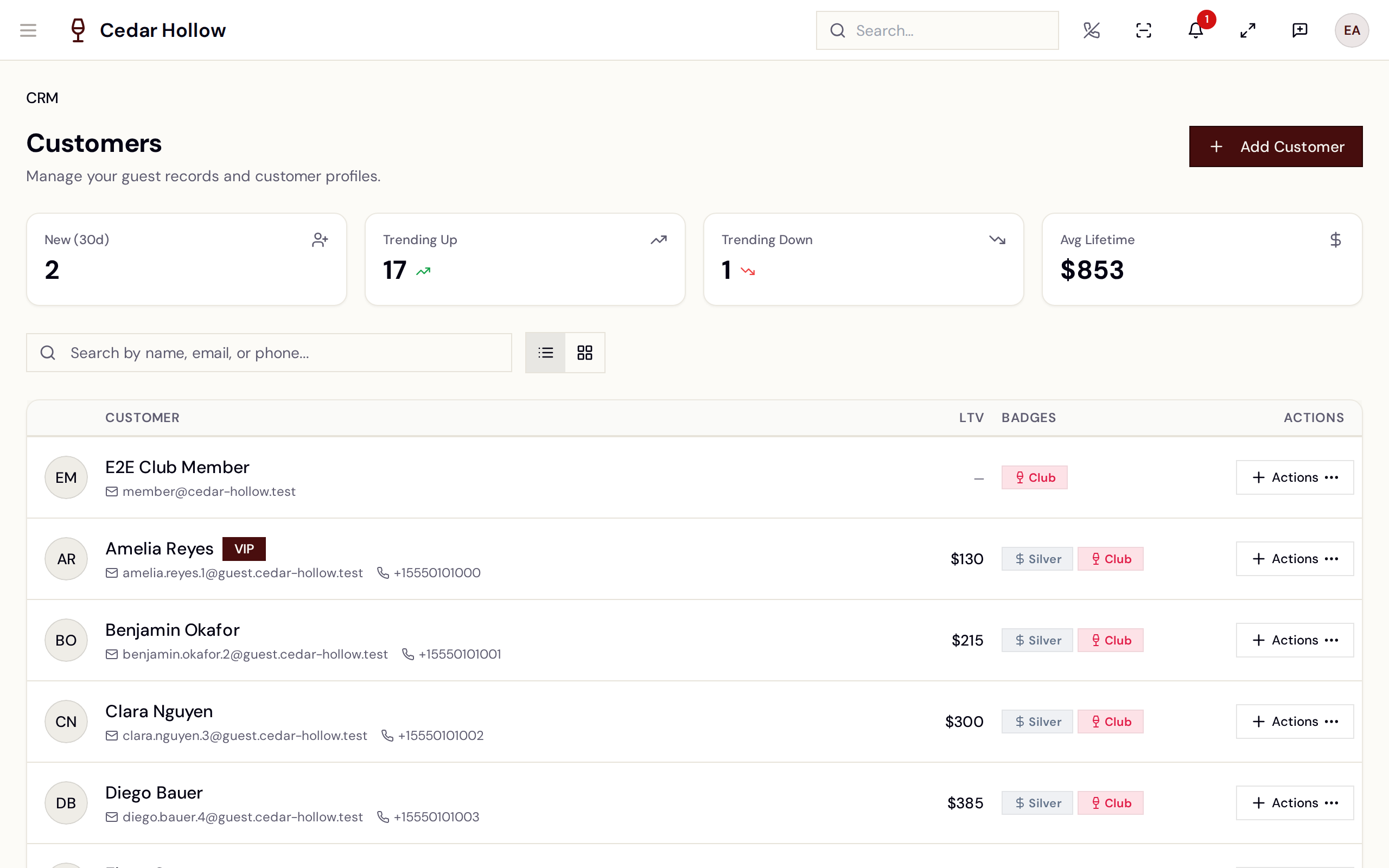
The Customers database — search, momentum filters, and the list.
List columns are Customer, LTV, Badges, and Actions. Rows carry a VIP badge, spend-tier badges, and a red Underage badge where it applies. Each row's Actions menu jumps straight into work: New Reservation, New Order, New Club Membership, Contact.
The only list filters today are the three momentum KPIs and text search. Guest tags show on the profile when present, but the tag-management UI is not built yet, and VIP can only be set when a profile is created — there is no VIP toggle on an existing profile.
Create a guest
Add Customer opens the New Customer Intake wizard ("Create a new customer profile with identity, date of birth, address, and optional card on file."). Its steps:
- ID Scan — only if ID scanning is enabled for your company (see below); otherwise the wizard starts at Identity.
- Identity — first and last name, plus at least one contact method (email or phone). When you enter an email, Avero soft-checks for duplicates on the spot.
- DOB & Eligibility — date of birth (
mm/dd/yyyy). Age is computed immediately and badged Eligible (21+) or Underage. If your company requires DOB for alcohol, the step says so: "Date of birth is required for alcohol purchases at this venue." - Address.
- Card on File — optionally capture a card, then Create Customer.
The New Customer Intake wizard — identity, eligibility, address, and card on file.
If the email matches an existing record, the wizard shows "Possible duplicates found" with each candidate: pick Use Existing to open that guest instead, or Create New Anyway to override deliberately.
Quick registration at the host stand is a separate two-step page at
/reception/new-guest (New Guest Check-In) — see
Walk-ins & waitlist. Both flows land in
the same CRM records.
The 360 profile
The profile header shows the name with its badges — VIP, Discreet, and an eligibility badge that reads ID Verified, 21+ on file, or Underage — plus the card on file (brand and last four, amber when expiring soon), the club tier, and the spend tier.
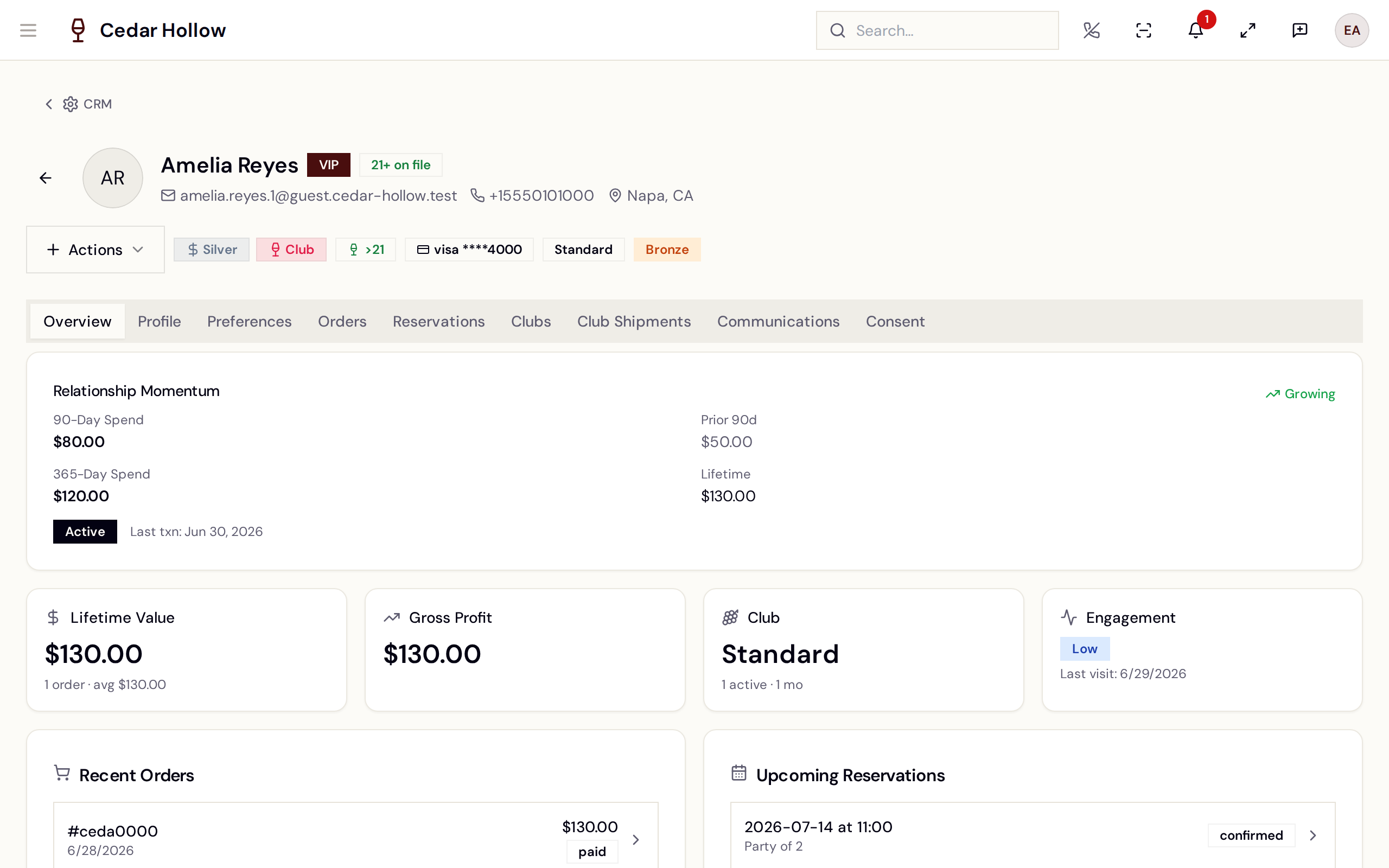
A guest's 360 profile — momentum, metrics, and the tab bar.
Nine tabs: Overview, Profile, Preferences, Orders, Reservations, Clubs, Club Shipments, Communications, and Consent.
- Overview — standing notices (allergies, cautions), the Relationship Momentum card (90-Day Spend, Prior 90d, 365-Day Spend, Lifetime, trending Growing / Declining / Steady), and four tiles: Lifetime Value, Gross Profit, Club, and Engagement (with "Last visit:"). Below: Recent Orders, Upcoming Reservations, Active Memberships, Recent Communications.
- Profile — Identity, Addresses (primary shipping/billing plus extras), card-on-file management, Alcohol Eligibility (below), Tags (display-only today), and Standing Notes — a Standing Note and a Service Note the floor sees.
- Preferences — Seating, Pace & Service, Wine Style, Accessibility, Occasion, each stamped "Last confirmed:".
- Orders / Reservations / Clubs / Club Shipments — the guest's history in each system, with status filters; club orders synced from Commerce7 carry a Club Order badge.
- Communications — the interaction log. Filter by channel (Phone, SMS, Email, In Person, Social, Other), and use Log Interaction, SMS Thread, or New Message to record or start outreach. A guest who unsubscribed shows SMS Opted Out.
- Consent — the Consent Audit Log of consent given and withdrawn.
The header's actions menu mirrors the list (New Reservation, New Order, New Club Membership, Contact) and adds Export PII Data and Delete Customer.
Verify ID (ID scan)
When Enable ID Scanning is on (Settings → Company → ID Verification
& Alcohol Compliance), staff can populate and verify a profile from a
driver's license. On the profile: Profile tab → Alcohol Eligibility →
Update from ID ("Scan the guest's ID to update their profile
information and verification status."). In the intake wizard it's the
first step. It needs a device camera and guests.update.
The wizard starts with an ID Scan Data Notice — "Please inform the guest before scanning" — and a consent checkbox before Proceed to Scan unlocks (or Skip ID Scan). Then three steps:
- Back Barcode — "Hold the back of the ID 6-8 inches from the camera…" reads the PDF417 barcode.
- Front OCR — photograph the front for text extraction.
- Results — the extracted fields with a Mismatches section where barcode and OCR disagree. Finish with Apply to Guest (existing profile) or Use Scanned Data (new intake), or Rescan.
The result drives the eligibility badge (ID Verified / 21+ on file / Underage) and the Alcohol Eligibility card's ID verification status.
Deleting a guest
Delete Customer is a privacy-grade action: the dialog warns "This will permanently delete [the guest]'s profile and all personal data. This action cannot be undone.", lists records that will be orphaned, and requires a DSAR Request ID — "A DSAR request must be filed before deleting a guest. Enter the request ID to confirm." — plus typing the guest's name before Delete Permanently activates.
Reference
| Control | Where | What it does |
|---|---|---|
| Add Customer | Customers header | Opens the New Customer Intake wizard. |
| KPI tiles | Customers header | New (30d) / Trending Up / Trending Down filter the list. |
| Use Existing | Duplicate panel | Opens the matched guest instead of creating a copy. |
| Create New Anyway | Duplicate panel | Deliberately creates a second record. |
| Update from ID | Profile → Alcohol Eligibility | Runs the ID scan wizard against this profile. |
| Log Interaction | Communications tab | Records a phone/SMS/email/in-person touch. |
| Export PII Data | Profile actions menu | Exports the guest's personal data (needs privacy.pii.export). |
| Delete Customer | Profile actions menu | DSAR-gated permanent deletion (needs guests.delete). |
Troubleshooting
- "You do not have permission to view guest records." — the CRM needs
guests.read; ask an admin to check your role. - "A customer with this email already exists." — you hit a hard duplicate; search for the guest and use their existing profile.
- The profile shows a "Read Only" badge — you hold
guests.readbut notguests.update; notes and edits are disabled. - "Camera access denied. Please allow camera access and try again." — the ID scan needs browser camera permission; allow it and rescan.
- "No customers yet" / "Add your first customer to get started." — the database is empty; Add Customer or intake at the host stand fills it.
- Can't set VIP on an existing guest — expected today; VIP is set at creation only, and tag editing isn't built yet.
Related
- Walk-ins & waitlist — reception check-in and floor-queue intake that create these records.
- Set up your wine club — memberships shown on the Clubs tab.
- Orders & fulfillment — the orders the profile links into.
- Settings — ID scanning, minimum drinking age, and data-retention policy.