Walk-ins & waitlist
The Visitors page (/visitors) is your host stand: today's arrivals,
the waitlist, everyone currently seated, and recent finishes — one screen,
four tabs. Parties move left to right as their visit progresses:
Upcoming → Waiting → Active → Completed
The page refreshes itself every 30 seconds (and reacts live to reservation changes), so it's safe to leave open on the host iPad all day. A toggle in the header switches between card view and a compact table view — the choice is remembered per device.
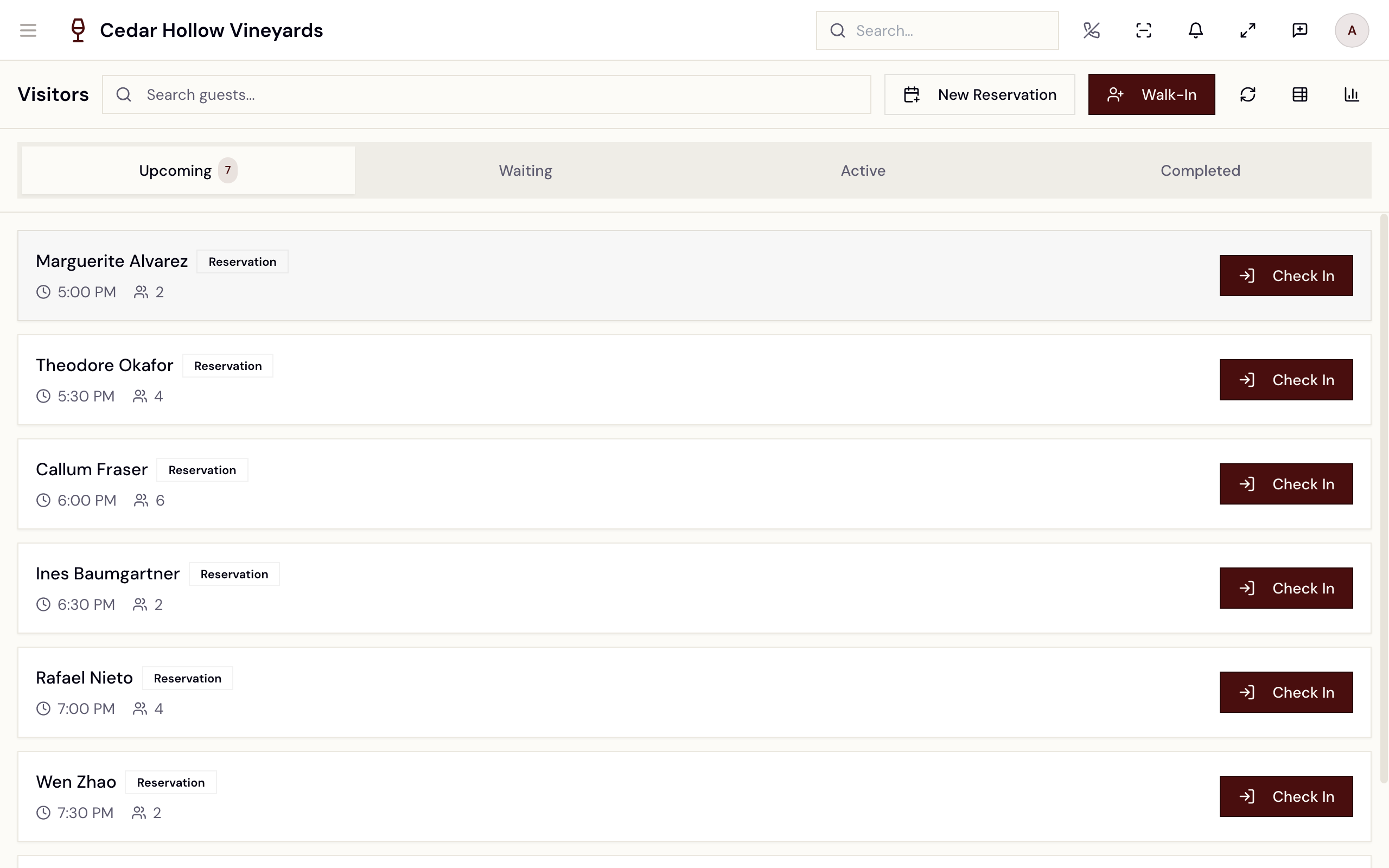
The Visitors page — the Upcoming / Waiting / Active / Completed tabs, with the day's parties as cards.
Who can use it
Viewing the Visitors page requires reservations.read — every standard role
has it, including Viewer. The actions are gated tighter, on the server:
- Check In (on this page) —
reservations.update: Manager, Concierge, and Ambassador (and Admins). - Walk-In / Add walk-in (on this page, or in the floor's Book & Queue
drawer) —
queue.create: Manager, Concierge, Wayfinder, Host, and Ambassador. - Seating —
floor.seat.assign; see Floor & seating. - New Guest Check-In (
/reception/new-guest) —guests.create.
A Host can't use the Visitors page's Check In (it needs
reservations.update), but can check the same reservation in from the
floor's Book & Queue drawer, which runs on queue.create. If Check In fails
with a permissions error, that's the difference you're seeing.
The four tabs
Each tab shows a count pill when it has parties, and a quiet empty state when it doesn't — "No upcoming reservations", "No guests waiting", "No active guests", "No recent completions".
| Tab | Who's in it | Card shows |
|---|---|---|
| Upcoming | Today's reservations that haven't checked in yet (confirmed, checking in, or paid), earliest first. | Guest name, Reservation / Walk-in badge, reserved time, party size. |
| Waiting | Checked-in parties and walk-ins in the queue, longest wait first. | A live wait timer ("Waiting 12m"), party size. |
| Active | Parties currently seated with an open visit. | Table badge (table + room), time since seated, and the open check total once there is one. |
| Completed | Visits that ended in the last 4 hours, most recent first. | How long ago they finished, and the final amount. |
What moves a party along: Check In moves it from Upcoming to Waiting, seating it at a table moves it from Waiting to Active, and closing out the visit moves it to Completed.
Check in a reservation
- Find the party on Upcoming (or use search — below).
- Tap Check In. The button spins while Avero confirms.
- On success you'll see "Checked in" — "Guest moved to Waiting." — and the page switches to the Waiting tab, where the party now sits with a running wait timer.
Checking in creates the party's queue entry — the thing the floor's seating flow works from. A reservation that isn't checked in can't be seated.
If your company policy requires a card on file at check-in, Avero blocks Check In for guests without one: "Check-in failed" — "Guest does not have a card on file. Please capture a card before seating." Capture a card on the guest's profile (or take their reservation payment) and try again. Reservations that are already paid always pass the gate.
Add a walk-in
Two buttons, depending on where you're standing. Both open the same dialog.
From the floor — quick check-in
The Book & Queue drawer on /floor has an Add walk-in button at
the top, beside New reservation. It opens the Quick Check-in Walk-in
dialog:
- Guest Name (required)
- Phone (optional)
- Party Size (1–20)
- Notes (optional) — "Special requests..."
The Quick Check-in Walk-in dialog, opened from Add walk-in in the floor's Book & Queue drawer.
Tap Add to Queue. The party lands in the queue as waiting — it appears on the Visitors Waiting tab and in the Book & Queue drawer, ready to seat. This also creates a lightweight guest record from the name and phone.
For a proper profile instead (email, consent, details), tap Full Customer Intake at the bottom of the dialog — it opens the full new-guest intake form. See Guests & CRM.
The drawer itself is worth reading: parties are grouped into half-hour time buckets, and each row carries the badges a host needs at a glance — a VIP flag, MEMBER for club members, PAID when the reservation is prepaid, and OVERDUE when a booking is past its time. Reservations still to arrive show their own Check In button right in the drawer; when the list is empty it reads "No guests waiting" — "Check in a reservation or add a walk-in".
From the Visitors page
The header's Walk-In button opens the same Quick Check-in Walk-in dialog as the floor: fill it in, tap Add to Queue, and the party appears on the Waiting tab. When the walk-in should book a specific experience and time slot rather than just join the queue, use New Reservation beside it instead — see Reservations & availability.
Seat a waiting party
On the Waiting tab, every card has two actions:
- Seat — hands off to the floor: Avero navigates to
/floorin Seating Mode with this party pre-selected, and you tap an available or reserved table to seat them. The full flow — the "Seating: Tap a table for [Guest] (Party of N)" banner, which tables you can tap, cancelling — is in Floor & seating. - Cart — jumps to the floor with the party's table selected, so you can open their cart.
Seating Mode on the floor — the Visitors Seat button lands here with the party pre-selected.
Seating flips the party to Active: the table becomes occupied, a visit opens, and their linked reservation (if any) is marked seated.
Active and completed visits
- Active cards show the table, how long the party has been seated, and the open check total. Open Cart jumps to their table on the floor to add items or settle — see Take an order (POS).
- Completed cards keep the last 4 hours of finished visits in reach. Summary opens the visit's order when there is one, or the reservation detail otherwise.
Find a guest fast
Tap the "Search guests..." field in the header to open the Search Guest dialog — type a "Name, email, or phone..." and Avero searches across all four tabs at once. Selecting a result with a reservation opens its detail page.
Insights
The bar-chart button in the header opens the Insights bottom sheet — "Last 24 hours" at a glance, as eight tiles: Visitors (24h), Walk-ins, Reservations, Checked In, Active Now, Completed, Conversion, and Avg Spend.
New Guest Check-In (/reception/new-guest)
A focused two-step intake for registering a brand-new guest at reception —
"Register a new guest and capture card on file." It requires
guests.create (without it the page shows "Access Denied" — "You do not
have permission to register new guests.").
- Guest Identity — First Name, Last Name, Email (required — "Email is required for reception check-in."), Phone (optional). If the email is already on file, you'll see "A guest with this email already exists." Tap Next: Card on File.
- Card on File — capture the guest's card, or skip. Either way you get a confirmation ("…checked in with card on file." or "…checked in (card skipped).") and land on the new guest's CRM profile.
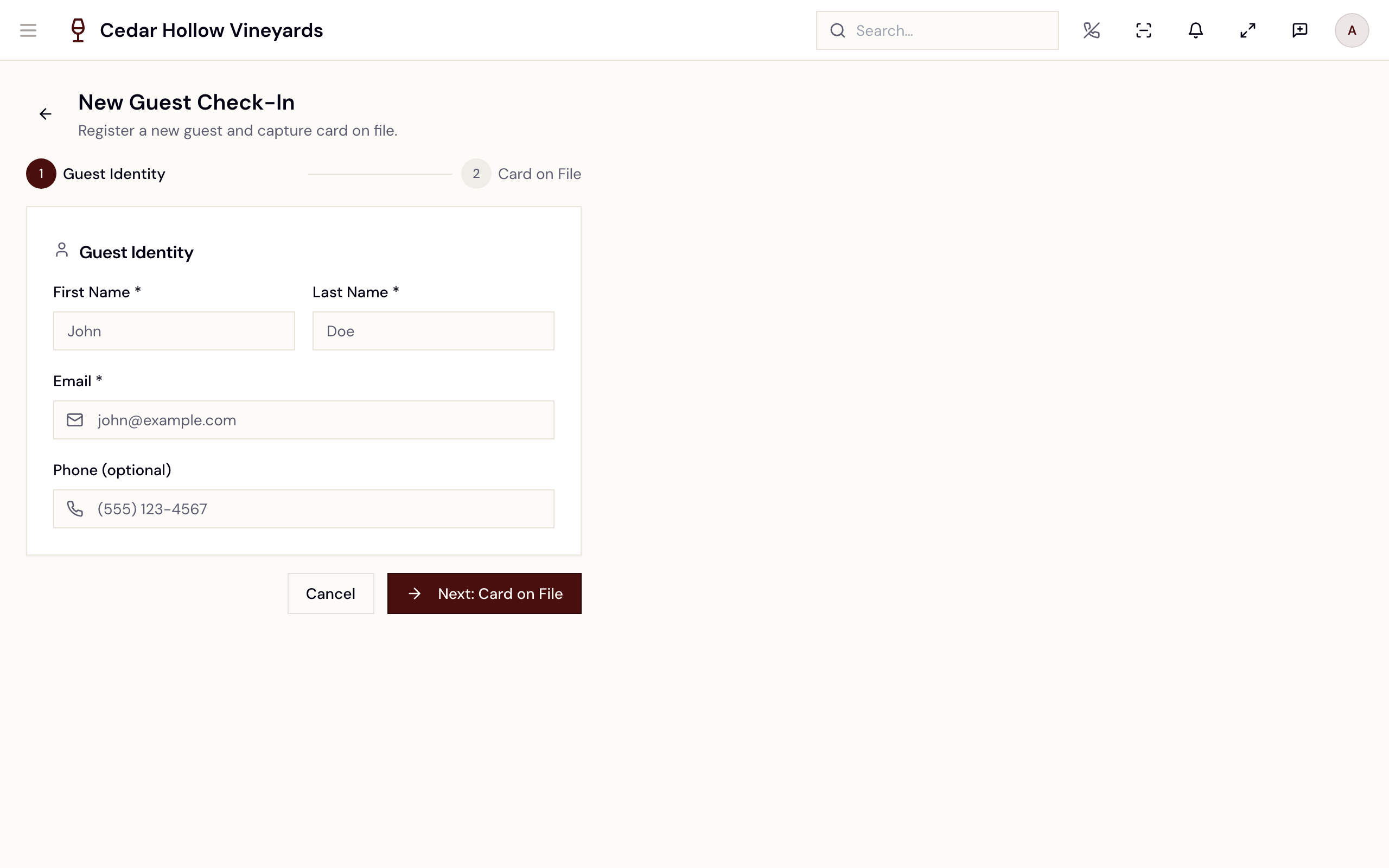
New Guest Check-In — the Guest Identity step, with Card on File next.
New Guest Check-In creates the CRM guest (and optionally their card). It
does not add the guest to the waitlist — do that from Walk-In on the
Visitors page or Add walk-in on the floor, or book them a reservation.
The page isn't linked from the main navigation; reach it directly at
/reception/new-guest.
Reference
| Control | Where | What it does |
|---|---|---|
| Tab bar | Top of page | Upcoming / Waiting / Active / Completed, with count pills. |
| Check In | Upcoming card | Moves the party into the queue (Waiting) — may be gated on a card on file. |
| Seat | Waiting card | Opens the floor in Seating Mode with this party selected. |
| Cart / Open Cart | Waiting / Active card | Jumps to the party's table on the floor. |
| Summary | Completed card | Opens the visit's order, or the reservation detail. |
| "Search guests..." | Header | Search Guest dialog — name, email, or phone across all tabs. |
| New Reservation | Header | Opens /reservations/new. |
| Walk-In | Header | Quick Check-in Walk-in dialog — straight into the queue. |
| Refresh / view toggle | Header | Manual refresh; switch card ↔ table view (remembered per device). |
| Insights | Header | Bottom sheet with the eight 24-hour KPI tiles. |
| Add walk-in | Floor Book & Queue | The same dialog, from the floor's drawer. |
Troubleshooting
- "Check-in failed" — the server refused the check-in; the toast carries
the reason. Most common: "Guest does not have a card on file. Please
capture a card before seating." (company policy requires a card at
check-in — capture one or take payment first). A permissions error here
means your role lacks
reservations.update— use the floor's Book & Queue drawer instead. - "Check in required before seating" — you tapped Seat on a party with no queue entry. Check the party in first; seating always works from the queue.
- A party you seated isn't in Active yet — Active is driven by the visit that opens at seating. Give the 30-second refresh a moment, or tap the refresh button in the header.
- A finished visit disappeared from Completed — Completed only keeps the last 4 hours. Find the sale in order history, or on the guest's profile in Guests & CRM.
- "No guests found" in Search Guest — the search only covers parties currently on the four tabs, not the whole CRM. For everyone else, use Guests & CRM.
Related
- Floor & seating — Seating Mode, the Book & Queue drawer, and table detail.
- Reservations & availability — the book that feeds the Upcoming tab.
- Take an order (POS) — the cart you open once they're seated.
- Guests & CRM — full guest profiles and intake.