Manager
The Manager tile appears on the dashboard only for staff who can view manager reports. It's the oversight hub for the current location — live and read-only, except for one actionable section: the pending-approvals queue. (Company-wide oversight lives in the Admin tile.)
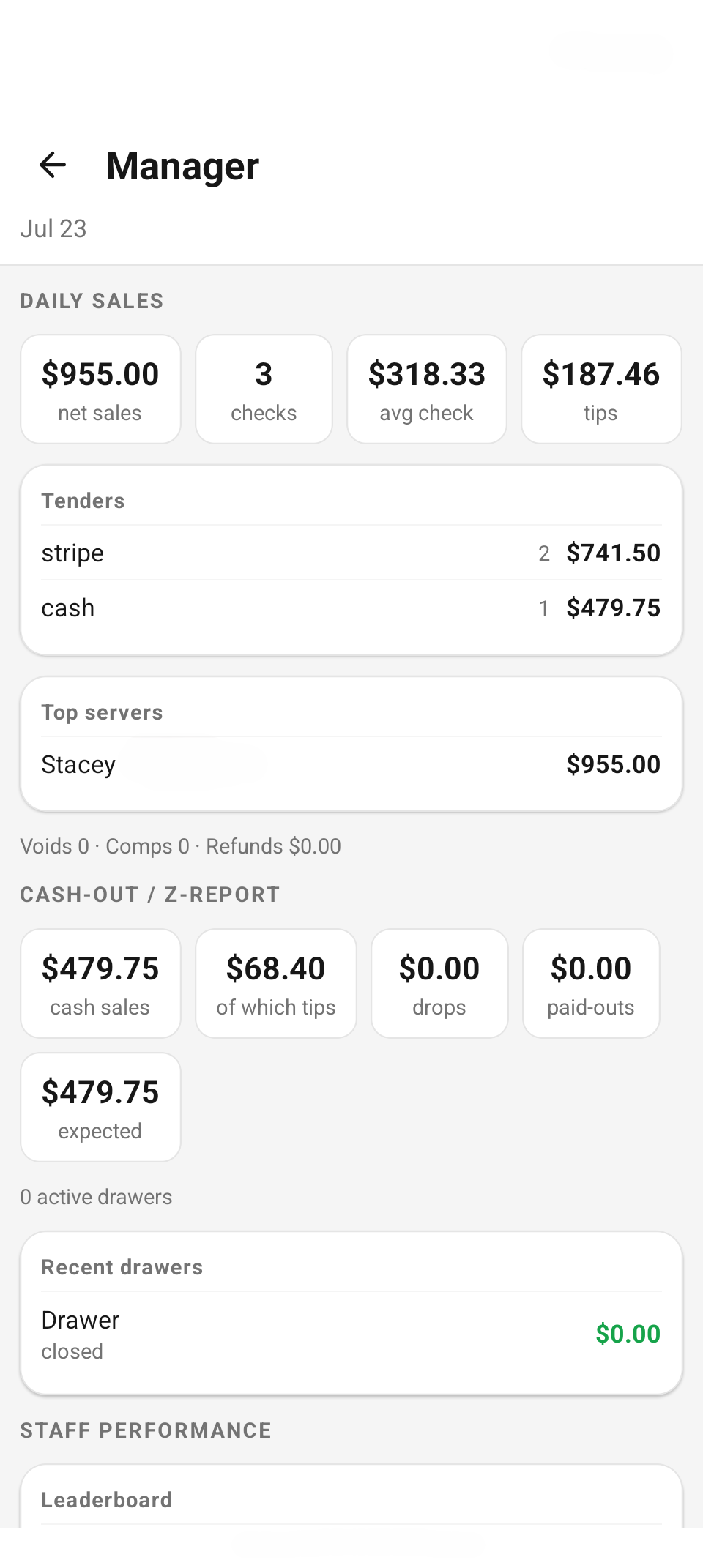
The Manager hub — daily-sales pills, tenders, cash-out / Z-report tiles, and the staff-performance leaderboard.
Daily sales
The day's headline numbers as four stat pills: net sales, checks (closed-check count), avg check (net ÷ checks), and tips. Under them:
- Tenders — sales by tender type (cash, card, gift card…), each with its count and amount.
- Top servers — the day's top five by net sales.
- A footnote totals the day's exceptions: "Voids 0 · Comps 0 · Refunds $0.00".
Each section loads independently, so one failing endpoint shows its own error card without blanking the rest of the screen.
Cash-out / Z-report
Five pills track the cash day: cash sales, of which tips, drops, paid-outs, and expected — the amount that should be in the drawers right now. A footnote counts active drawers ("0 active drawers").
Recent drawers lists the last few drawer sessions with their status and over/short — green when over or exactly balanced, red when short, and a dash for a drawer that hasn't been counted yet (so an uncounted drawer never reads as a perfectly balanced $0.00).
This section shows the numbers. Opening, counting, and closing a drawer happens on End of Shift — see below.
Staff performance
The Leaderboard ranks every server on shift by net sales, each row breaking out "3 checks · avg $68.67 · tips $12.00". Below it, Staff on shift shows who's signed in right now and for how long ("2h 15m").
Pending approvals
The one place on this screen where you act: comps, refunds, and voids waiting on a manager. Each row shows the type (COMP / REFUND / VOID), a label, who requested it ("by Stacey"), the guest, the recorded reason, and the amount — with Approve and Decline buttons.
Every decision confirms first — these move real money:
- Approving a refund warns: "This issues a refund — money goes back to the guest and it can't be undone."
- Declining is styled destructive and confirms too.
- A comp with no associated check can't be actioned — "Can't action this comp — It has no associated check."
Approvals below it is the recent history — the last approved comps, voids, and refunds with who approved, the reason, when, and the amount.
Discount approvals can also be cleared right at the register with the manager PIN pad — see Manager approval & thresholds. This queue catches whatever was left pending.
End of Shift & the cash drawer
The End of Shift tile (every staff member has it) is where the money day actually closes.
Cash drawer
- Open a drawer — enter the opening float, an optional label ("e.g. Bar drawer"), and — managers only — assign it to a team member for their shift (default: Myself). The drawer you open becomes your bound drawer: cash payments you take book against it.
- Count & Close — the app shows the expected amount; count the cash and enter the total. A blank count is refused ("Count the drawer and enter the total before closing."), and closing confirms: "Closing with $412.00 counted. This ends the shift's drawer and can't be undone."
- The Z-report result follows immediately: Expected vs. Counted and the Over / Short, color-coded. Closed drawers then appear in the Manager hub's Recent drawers.
Tips & tip-out
- TIPS TODAY — your collected tips and how many tipped checks they came from, with the individual Tipped checks listed below.
- Tip-out — enter a percentage of tips for Support and Bar; the screen computes each cut and your Net take-home live. Percentages that add up past 100% are flagged ("Tip-out exceeds tips collected — reduce the percentages") and the net is floored at zero.
- Record tip-out saves the split to your shift; the button flips to "Tip-out recorded" with a timestamp, and re-arms if you change the numbers.
- Managers additionally see SHIFT TIPS · ALL SERVERS — the location's tip total and a per-server breakdown, so an owner who didn't ring sales personally doesn't mistake their own $0 for missing tips.
Reference
| Section | Live data | Actions |
|---|---|---|
| Daily sales | Net, checks, avg, tips; tenders; top servers; voids footnote | — |
| Cash-out / Z-report | Cash sales, tips, drops, paid-outs, expected; recent drawers | — |
| Staff performance | Leaderboard + staff on shift | — |
| Pending approvals | Comps / refunds / voids awaiting a manager | Approve / Decline |
| Approvals | Recent approval history | — |
| End of Shift | Drawer, tips, tip-out | Open / count & close, record tip-out |
Related
- Admin tile — company-wide reporting, staff, and devices.
- Split & discounts — how discounts end up in the approval queue.
- Daily operations on the web — cash drawers, the daily sheet, and announcements in the staff web app.
- Reports — the full Daily Sales Summary.