Reservations & availability
The reservation book lives at /reservations — the Reservations
page. It shows one day at a time (use the arrows, the date field or
Today to move days) and has two views, toggled at the right of the
filter row:
- Manifest — the day's bookings as a list. This is the book.
- Availability — every experience's time slots for the day, with how full each one is.
The header keeps score for the day: ARRIVALS counts parties still expected or checking in against all non-canceled bookings, and PENDING counts no-shows.
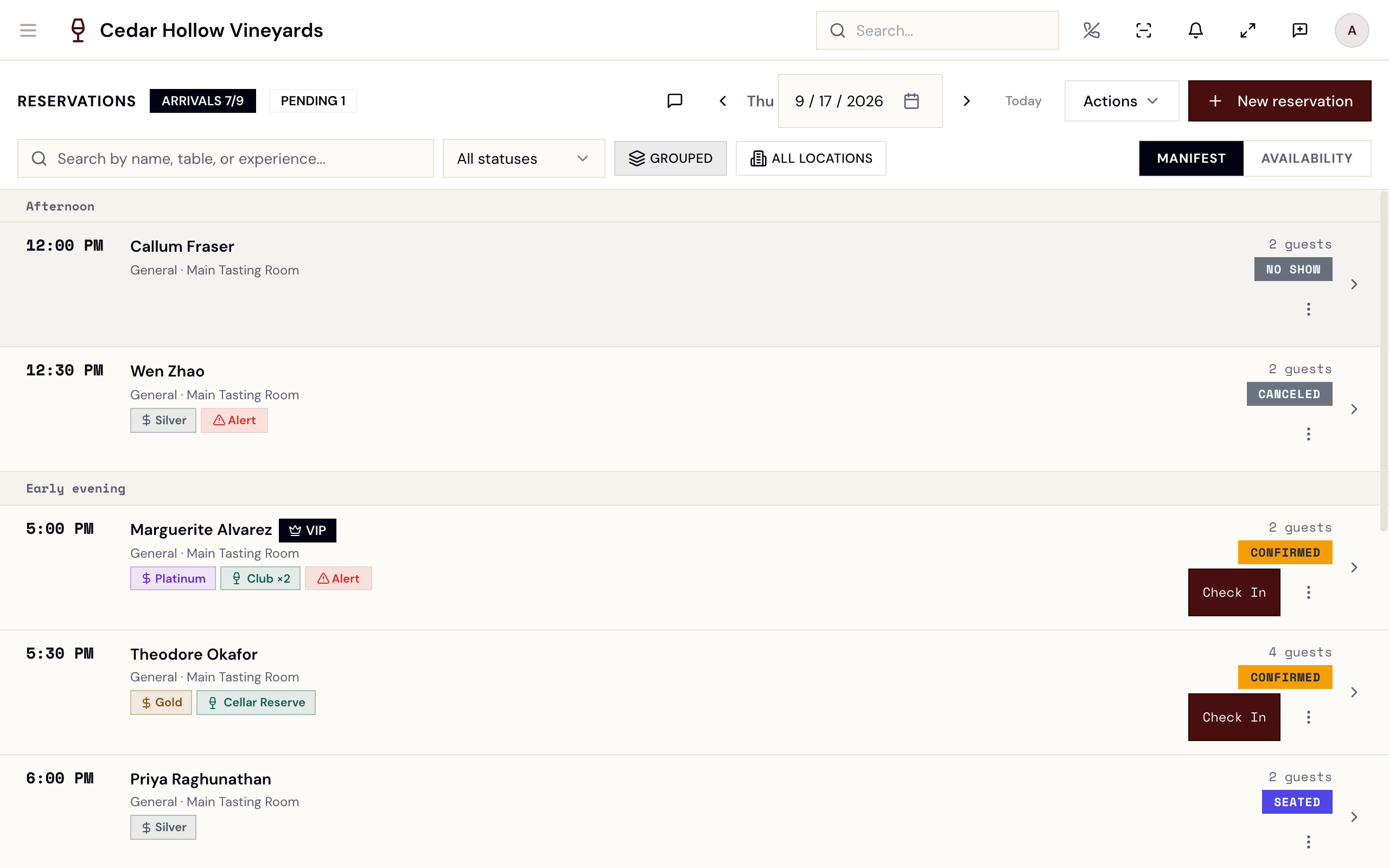
The reservation book — the day's manifest, with search, grouping, and the Manifest / Availability toggle.
Who can use it
- See the book —
reservations.read; every standard role has it. - Create bookings —
reservations.create; also held by every standard role, from Manager down to Viewer. Without it, the New reservation button is disabled ("Your role doesn't allow creating reservations") and the booking page shows "Permission required". - Edit and cancel —
reservations.update/reservations.cancel: Manager, Concierge, and Ambassador (and Admins). - Void a paid booking —
reservations.void: Admins and Managers only. - Experiences and the builder (
/admin/experiences) — Admins and Managers only (experiences.update). Closing and reopening days on the capacity calendar needsavailability.close_slot, which the same two roles hold. Everyone else sees availability read-only.
Read the manifest
The manifest has no column headings. Rows sit under day-part headers — Morning, Afternoon, Early evening, Late evening — and each row leads with the time. Next to it are the guest's name (with a VIP flag, allergy chips and guest badges when they apply) and, on one line beneath, the experience (or General), the table's section and the location. On the right are the party size ("2 guests"), the table name, and a status badge. Bookings made with Walk-in carry an extra AD HOC badge, and a booking with a payment link shows Deposit due, Deposit paid or Refunded.
The seven statuses you'll see, in lifecycle order:
| Badge | Meaning |
|---|---|
| CONFIRMED | Booked, not yet arrived. |
| CHECKING-IN | Checked in — the party is in the queue, seatable. |
| SEATED | At a table with an open visit. |
| PAID | Settled. |
| REFUNDED | Payment returned. |
| NO SHOW | Never arrived (counts in the PENDING badge). |
| CANCELED | Canceled — the slot was released. |
Find things with the search box ("Search by name, table, or experience...") or narrow the list with the status select beside it (All statuses, Confirmed, Checking in, Seated, Paid, No show, Canceled). Tapping a row opens the reservation's detail.
Grouped view and the tabs workspace
- Grouped (on by default) folds related bookings — same guest cluster — into one row with a +N count badge; expand it to see each child. All Locations widens grouping across your whole company.
- Groups where every child is confirmed, on a single experience, can be merged into one party (Merge / Unmerge). Groups that span locations are labeled "Cross-location groups are display only. Merge is not supported."
- Open All on an expanded group opens each booking in the tabs workspace — a split panel on the right where multiple reservations stay open side by side. (Past ten tabs Avero warns "You have more than 10 reservation tabs open. Performance may degrade.")
Check in and cancel from the book
- Rows with status CONFIRMED show a Check In button — it drops the
party into the arrivals queue, same as checking in from the
Visitors page. Checking in needs
queue.create(Manager, Concierge, Wayfinder, Host, Ambassador and Admins). - The row's kebab menu holds Cancel reservation (disabled for canceled, paid, or refunded bookings; for a seated party it reads "Seated — cannot cancel"). Avero confirms — "Cancel reservation?" — "Cancel reservation for [guest] at [time]? This frees the slot and notifies the guest." — with Keep reservation / Cancel reservation.
Cancel releases the booked capacity immediately and sends the guest a cancellation notice. There's no undo — rebook if it was a mistake.
Matching a guest to the right table
The wizard's Availability step can filter by what a party actually needs, not just when they want to come. Under Requirements, Step-free access and Outdoors are recorded on the seating area itself, so ticking them narrows the times shown to those that can genuinely seat the party. Each box shows how many seating areas are recorded as meeting it.
Worth setting up once on your seating areas rather than remembering it per booking: a guest who needs step-free access should not depend on whoever takes the call knowing which room has a step. An unmarked seating area is treated as not verified, never as a yes. (The wizard's own messages still use the older word "surface" — "No surface is recorded as meeting that requirement" means no seating area has it recorded.)
Seeing how busy a day is before you book
The capacity view — commitments across experiences, bookable in place.
/admin/experiences/capacity — the Capacity page, opened from
Actions → Capacity calendar — answers "how busy is Friday" across
experiences. It is a grid of fourteen days with one row for each active
experience; arrows move it a fortnight at a time and a select narrows it to
one location. Each cell is Quiet, Filling, Full, Closed,
Not running or No availability built.
Use it when someone asks for a date rather than a time. Select a single day on an experience's row and press Book — the booking wizard opens for that experience and date. Book takes one day at a time; with more than one selected it is unavailable and says "one day at a time".
Voiding a booking that has been paid
Cancel is deliberately unavailable once a booking is paid or refunded — money has moved, and "cancel" would quietly leave it where it is. Those bookings are voided instead: Void & refund in the same row menu, or Void & Refund on the reservation's detail page.
Voiding does both halves of the job in one action: it refunds the deposit in full and releases the seat. Avero confirms first — "Void and refund this reservation?" — then reports "Reservation voided" with "Seat released and the deposit refunded." If it says "Seat released — the refund needs review." instead, the seat is free but the money did not all go back; check the payment.
It needs the reservations.void permission (Admins and Managers), so the
option only appears for staff who hold it. On the detail page everyone
else sees "This reservation has been settled. Voiding it refunds the
guest, which needs a manager."
Cancel for a booking nobody has paid for. Void & refund for one somebody has. If the menu offers neither, check the status: an already-canceled booking has nothing left to release, and a seated party cannot be canceled.
No-shows
The web book has no button for marking a no-show: it is done from the Companion app or automatically. Either way it releases capacity, but sends no cancellation email. If your reservation policy sets an auto no-show grace period (configurable at company, brand, experience, or event scope), Avero sweeps every 5 minutes and marks still-unarrived confirmed reservations that are past their start time plus the grace period.
The Actions menu
| Action | What it does |
|---|---|
| Capacity calendar | Opens the fortnight view at /admin/experiences/capacity. |
| Print Reservations | Opens the day on the Daily Sheet — the run-of-day view. |
| Export Reservations | The Export Reservations dialog — "Download a CSV of reservations. Choose a date range or export all time." |
| Hold Time | The Hold Time Block dialog — "Block a time range from appearing as available…" Pick location, start/end, and a reason ("Private event, maintenance, staff meeting…"). Existing holds are listed with delete. |
| Walk-in | Opens the Ad Hoc Reservation dialog for the day you are viewing — an off-the-books booking. "Capacity limits are not enforced for ad hoc reservations." Party size up to 200. Hidden without reservations.create. |
A time hold rejects new bookings in its window ("Time slot is blocked by an active hold"), but the Availability grid doesn't gray held slots out — the block lands when someone tries to book.
Create a reservation
New reservation in the header (or New Reservation on the Visitors
page, or New reservation in the floor's Book & Queue drawer) opens
/reservations/new — a stepped booking wizard: Guest,
Availability, Add-ons, Deposit, Confirmed.
The booking wizard — guest first, then availability, add-ons and deposit, with a running cost as you go.
The wizard has no date field. Opened from New reservation it books today. To book another day, go to that day in the book, switch to Availability and tap a slot — or pick the day on the capacity calendar and press Book. Both open the wizard on that date.
- Guest — "Who is this reservation for?" Type at least two
characters in Find the guest ("Name, phone or email") and tap a
match to move on. No match? New guest asks for Name, Phone
and Email; if the details match someone already on file Avero warns
"This guest may already exist" and offers Use [name] instead.
Create and continue saves the guest (needs
guests.create); Back to search returns to the search. - Availability — three columns. On the left, Refine: Party size (1–12), Locations, Experience type and Requirements. In the middle, the day's openings that can take the party, grouped by location; drag the time slider to the time the guest asked for and the list reorders nearest-first. Each row shows the time, the experience, its seating area and how many places are left ("8 left"). On the right, Booking for (with Change guest) and Estimated cost.
- Pick the table — tap an opening to see Tables you can assign, each with "seats N". Tables that cannot take the party are hidden; Show why lists the reason for each ("already booked", "held for [event]", "this experience is held in [seating area]"). Choose a table and press Add [table] at [time] — "Adding takes you to add-ons. Nothing is charged yet." The button reads Pick a table until you choose one.
- Add-ons — "Anything to add?" Use the plus and minus buttons on any add-on offered for this experience, seating area or location. If none is offered the step says "Nothing to add on this booking". Notes for this booking ("Occasion, seating preference, anything the host should know") is here too. Press Next.
- Deposit — the heading reads "A deposit is required." or "No deposit is required.", and the booking is listed with its deposit and Edit / Remove. Add another time takes you back to Availability to add a second booking for the same guest on the same date; the party size carries over. When you are done, press Confirm reservation (the button reads Confirm N reservations for several, or Confirm — $X deposit when a deposit is due).
- Confirmed — "Reservation confirmed", with each booking's confirmation code to read back to the guest. Open reservation goes to its detail page; Back to the day (or Done) returns to where you started.
The guest's allergies show as chips beside their name through the wizard. They are kept on the guest's profile, and can be edited from the reservation's detail page after booking.
Take payment after booking
The Deposit step tells you what is due; it does not take the money. The wizard says so on the step: "Collection from this screen is not wired yet (staff endpoints pending); it can be taken from the reservation once confirmed."
To collect, press Open reservation on the Confirmed step (or tap the booking in the book) and use Collect Payment in the Payments panel. The Collect Payment dialog asks "How would you like to collect payment?":
- Send Payment Link — a Stripe checkout link to share with the guest
(needs
payment_links.create). - Card Present / Terminal — a card reader at this location.
- Open POS Payment — opens the POS with the reservation charge
pre-loaded — "supports cash, card, gift card, and more" (needs
checks.create).
If you made several bookings in one pass, each is its own reservation and is collected from its own page.
When the slot is nearly full
The Availability step only lists openings with enough places left for the party, so a full slot simply does not appear. If the day has nothing that fits, the step says "Nothing open on [date] for [party size]".
An experience can also limit how many separate groups share a slot. The wizard has no override for that limit, or for people capacity: if either is hit when you confirm, the booking is refused with "That slot was just taken" — "Pick another time or table — availability moved while you were booking." — and you are returned to Availability. For a party you have decided to take regardless, use Actions → Walk-in, which does not enforce capacity limits.
Reservation detail
Tapping any booking opens /reservations/:id — the Edit
Reservation form (Date, Party Size, Location,
Experience, Time, Floor, Table, Notes, and the guest's
allergies), plus three panels:
- Guest Insights — VIP/club/spend badges, visit history, alerts, wine
club status, preferences, and a Quick Note box. Read-only without
guests.update. - Payments — the booking's payment state (Unpaid, Pending, Awaiting Payment, Paid, Expired, Failed, Canceled, Refunded), with Collect Payment / Copy Payment Link actions.
- Merged Reservations — the group, when the booking is part of one.
In the Table select, tables show "(seats N)", and unavailable ones say why ("— reserved", "— held for [event]").
Edits save with Update Reservation (needs reservations.update). A red
Cancel Reservation button runs the same confirmation as the manifest;
on a paid or refunded booking it is replaced by Void & Refund, and on a
seated one by "This party is seated — service has started, so the
reservation can no longer be canceled." Canceled bookings become
read-only: "This reservation has been canceled and is read-only."
Check-in doesn't live on the detail page — check parties in from the book row, the Visitors page, or the floor's Book & Queue drawer. From the floor, an occupied table's detail panel also links each seated party back to its reservation — see Floor & seating.
The Availability view
The Availability toggle swaps the manifest for the day's capacity grid: one row per active experience (Experience, Location, Dur., Price, Available Time Slots).
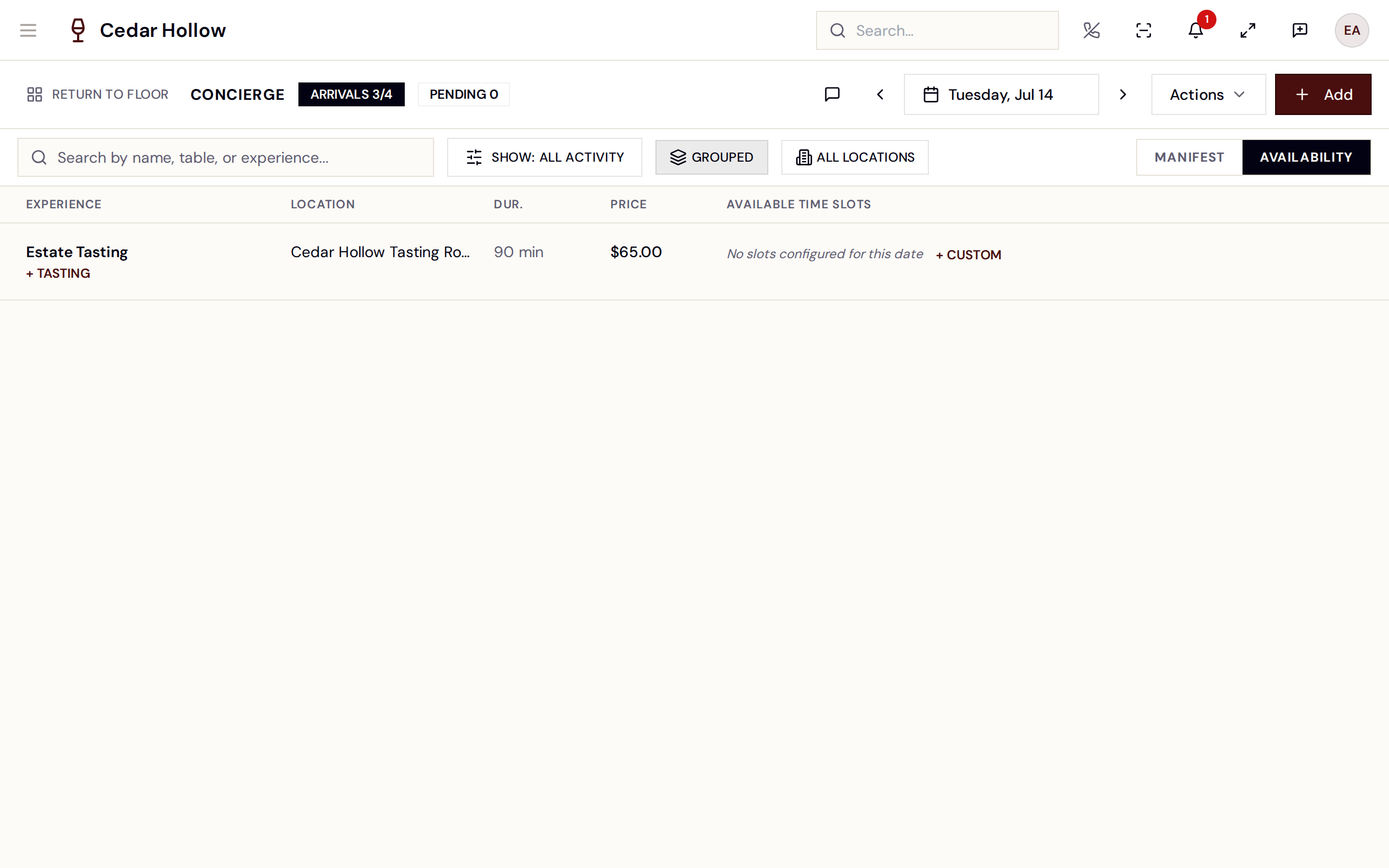
The Availability view — solid slots are open, Limited means over 70% booked, Waitlist means full or closed.
This picture shows an earlier version of this screen. The steps on this page are current.
Each slot chip is color-coded: solid = open, Limited = more than 70% booked, Waitlist = full or closed. Tapping a slot opens the booking wizard for that date, experience and location. + CUSTOM opens the wizard for that date and experience without a time, an experience with nothing set up for the day reads "No slots configured for this date", and a Time Holds section lists the day's holds with their reasons.
What makes a slot bookable
Behind the grid, availability is built from three things — all managed by
Admins and Managers at /admin/experiences (Experiences in the
header menu):
-
Experiences — the bookable products (a seated tasting, a tour). Each has a duration, per-person price, optional deposit, and guest limits. An experience is Standard, Club members or VIP — who it is for, rather than what shape it is.
Experience or Event? They are different halves of the productBook an Experience when someone reserves a table or a slot — a tasting, a tour, a private sitting. Capacity is people, and the guest holds a reservation.
Build an Event when you are selling tickets — ticket types, admissions, check-in at the door. That is a separate subsystem with its own wizard, planning sheet and refund handling; see Events.
Experiences used to offer an "Event" type, which meant something unrelated to the ticketed-events side and sent people to the wrong half. It has been withdrawn — anything still set that way now reads as Standard.
-
A schedule — the days the experience runs and the slot times on each, set in the builder and committed with Apply Schedule.
-
Built availability — the actual bookable inventory, created when the experience is activated.
Capacity is measured in people, not reservations — a slot with capacity
20 can hold one party of 20 or ten parties of 2. What's left is always
total − held − booked. An optional "Max groups at one time slot" on
the experience additionally caps how many separate parties share a slot.
A date with no availability built takes no reservations. The capacity calendar marks those days No availability built, and the booking wizard says "No configured capacity on [date]." There is no button to generate capacity by hand: it is built when the experience is activated in the builder.
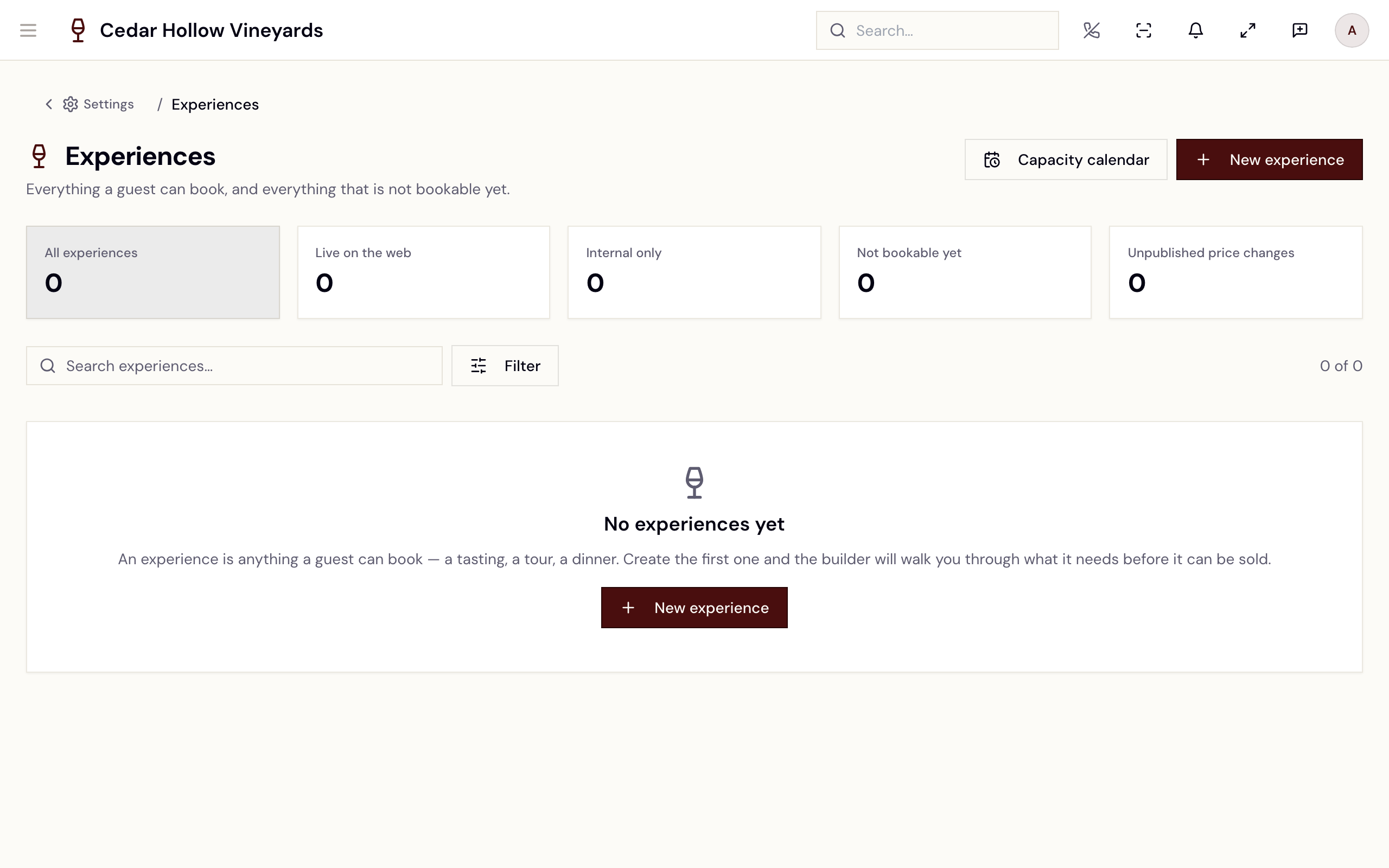
The experiences list
/admin/experiences is one table of every experience — "Everything a
guest can book, and everything that is not bookable yet." Columns:
Experience, Where it runs, Schedule, Price, State.
Five tiles above the table count the experiences and filter the list when tapped: All experiences, Live on the web, Internal only, Not bookable yet and Unpublished price changes. A search box ("Search experiences…") and a Filter button (Kind, Brand, Location) narrow it further.
The button at the end of each row opens the builder: Edit, or Finish
setup when something still stops the experience being booked. Staff
without experiences.update see View instead. New experience
creates an "Untitled Experience" and opens it in the builder; Capacity
calendar opens the fortnight view.
The Experience builder
The row button opens
/admin/experiences/:experienceId/builder — three steps:
Define, Schedule & price, and Publish.
The Experience builder — three steps, autosaved as you type.
-
Define — everything that describes the experience in one place:
- The basics — name, Description, Brand, Kind and Department.
- Where it runs — Location and Room or seating area. With no seating area chosen, "Bookings can be seated at any table in this location. Choosing a seating area limits that." — the table list in the booking wizard then hides tables outside it.
- Where it can be booked — the channels that sell it. Staff can always book an active experience; every other channel is a choice.
- How long, and how many — Duration (minutes) and Turnaround (minutes) ("Reset time before the next party."), Smallest party and Largest party, Max capacity ("Total seats offered in one slot.") and Max groups at one time slot.
- What it costs — Price a person ($), Deposit taken at booking ($) ("Per person, in dollars."), SKU, Tax code, and what happens to the deposit on a cancellation.
- What guests can add — the add-on sets offered with this experience — and Pictures.
-
Schedule & price — under Days, pick the days it runs and the Timezone, then Auto-Generate Slots builds slot times from the experience's duration + turnaround (or add slots by hand on the week grid). Each slot has a Time, Seats and a Price — the base per-person price, or This slot for its own; price changes sit in draft until you Publish Pricing ("Published prices will immediately take effect."). Finish with Apply Schedule — "Templates and slot rules have been created/updated." Until then a note reminds you the draft isn't live yet.
How far ahead guests can book is on this step too: Bookable from, Bookable until ("Leave empty to run indefinitely."), Days visible at once ("A rolling window from today."), Book at least (minutes ahead) and Stop taking bookings (minutes before).
-
Publish — What you are publishing summarises the experience; anything missing is listed under "Fix these before publishing" with a Go to Step button; and Publishing will states what is about to happen before it does. Then Activate (Internal Only) or Activate & Publish to Web. Activation starts building availability automatically ("Experience is now active. Generating capacity..."), and the page tracks it to "Capacity generated successfully" — with Try again if it fails. An active experience can later be switched with Publish to Web, Unpublish from Web or Deactivate.
The capacity calendar
/admin/experiences/capacity shows the fortnight for every active
experience (see
Seeing how busy a day is).
Besides booking from it, staff with availability.close_slot can close
days: select one or more days, type a reason ("Why? e.g. private
buyout") and press Close these; Reopen these reverses it. Avero
reports "Slots closed" or "Slots reopened". Closing stops new bookings;
it does not cancel the ones already taken.
When an experience's availability does not reach far enough ahead, a warning names it — "…has availability built through [date] — guests cannot book it after that." — with Open the builder. There is no generate button on this page.
Reference
| Control | Where | What it does |
|---|---|---|
| Date arrows / date field / Today | Header | Move the book a day at a time, pick a date, or jump back to today. |
| ARRIVALS / PENDING | Header | Expected-arrivals count and no-show count for the day. |
| Manifest / Availability | Filter row | Switch between the booking list and the capacity grid. |
| Grouped / All Locations | Filter row | Fold related bookings; widen grouping company-wide. |
| Check In | Confirmed row | Puts the party in the arrivals queue. |
| Kebab → Cancel reservation | Row | Cancels with confirmation; frees the slot, notifies the guest. |
| Kebab → Void & refund | Paid or refunded row | Refunds the deposit in full and releases the seat. |
| Actions menu | Header | Capacity calendar, print (Daily Sheet), CSV export, holds, walk-in. |
| New reservation | Header | Opens the booking wizard at /reservations/new. |
| Collect Payment | Detail page → Payments | Opens the Collect Payment dialog for that reservation. |
| Slot chip | Availability view | Opens the wizard on that date; Limited / Waitlist show pressure. |
| Close these / Reopen these | /admin/experiences/capacity | Closes or reopens the selected days, with a reason. |
Troubleshooting
- "Nothing open on [date] for [party size]" — no experience has an opening that fits that day. Clear a filter in Refine or try a smaller party; a manager can check the capacity calendar for the date. No availability built means the experience's availability does not reach that far — open it in the builder.
- "No surface is recorded as meeting that requirement" — a Requirements box is ticked that no seating area has recorded. It is a missing record, not a full day.
- "That slot was just taken" — the slot, the table or the group limit filled between choosing and confirming. Pick another time or table.
- "N of M reservations were created" — when booking several at once, one failed. The rest are confirmed and removed from the list; pick another time for the one that failed.
- "Capacity not configured for this time slot. Please generate availability." — the date has no availability built; see above.
- "Insufficient capacity. Available: N people, requested: N people" — the party doesn't fit in what's left of the slot. Book a smaller party, another slot, or (deliberately) use Actions → Walk-in.
- "Slot is closed for reservations" — the day was closed on the capacity calendar; reopen it there with Reopen these.
- "Time slot is blocked by an active hold" — remove the hold via Actions → Hold Time, or book around it.
- "Table is already reserved from [time] to [time]" — table conflict when editing a reservation; pick another table.
Related
- Walk-ins & waitlist — check-in, the queue, and guests without a booking.
- Floor & seating — seat checked-in parties.
- Daily operations — the Daily Sheet the book's Print action opens.
- Events — ticketed events, as opposed to bookable experiences.