Take an order (POS)
Avero's register runs on checks — a check is the running cart for one sale. There are two places you build one:
/sale— the standalone POS terminal for retail sales (bottles, merch, walk-up purchases). This guide is mostly about this page.- The floor (
/floor) — the same cart, opened from a seated table. The last section covers what's different there.
When you're ready to take money, the Settle button opens the checkout panel — that whole flow lives in Settle a check & take payment.
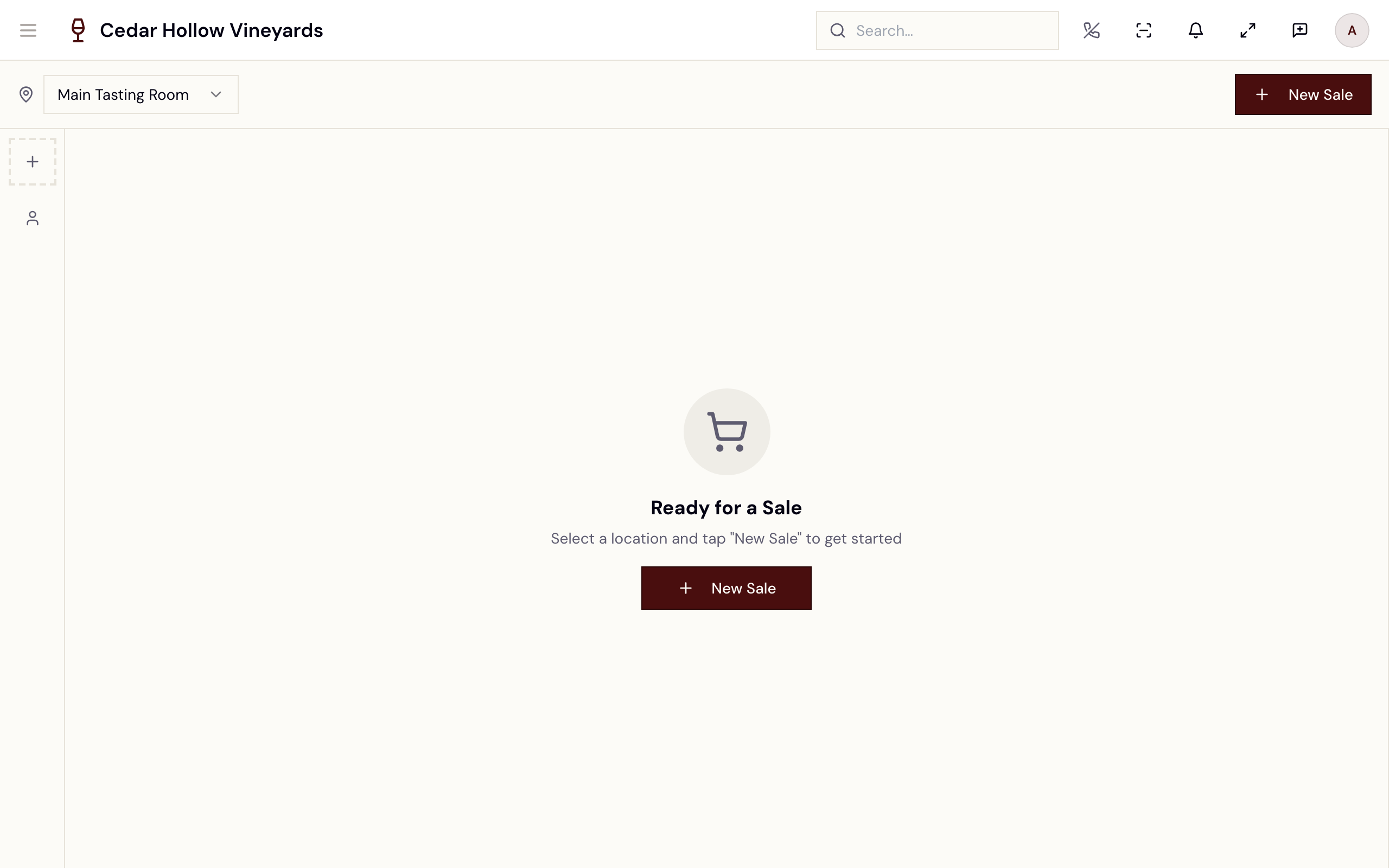
The POS terminal — product grid in the middle, the cart on the right, the open-carts rail on the far left.
Who can use it
Anyone whose role grants the check permissions can run the register:
checks.create (start a sale), checks.read, and checks.update (add items,
fire, split, pay). Two actions are gated tighter:
- Manager override for alcohol —
checks.alcohol_override. - Comps and custom discounts —
incentives.activate(see Discounts at the register).
Start a sale
- Pick your location in the top-left selector (Avero preselects your assigned location). If you switch locations while a sale with items is open, Avero asks first — "You have an active sale with items. Switching locations will discard the current sale."
- Tap New Sale. With no active sale, the page shows a "Ready for a Sale" hero — "Select a location and tap "New Sale" to get started".
Your active sale survives a page refresh: the terminal remembers your current check per location and per user and reopens it.
"New Sale" opens a fresh retail check. It stays open (and visible in the open-carts rail) until it's paid, turned into an order, or abandoned — by you, or by the end-of-day close.
The open-carts rail
The narrow rail on the far left shows one round pip per open retail cart at your location, oldest first. It's how you park a sale and come back to it — or pick up a teammate's.
- Pip label — the customer's initials, or W for a walk-in.
- Item badge — a small count badge appears once the cart has items.
- Freshness dot — the dot under each pip ages with the cart: fresh (green) under 30 minutes, aging (yellow) from 30 minutes to 2 hours, stale (red) past 2 hours.
- Tooltip — hover/long-press a pip for the details: customer name, item count, and when it was opened.
+pip — starts a new sale (same as the New Sale button).
My carts vs. All staff carts
The rail defaults to your carts only. The person-icon button under the
+ pip toggles it:
- "Showing my carts — tap for all staff carts"
- "Showing all staff carts — tap for my carts"
In all-staff mode a teammate's cart shows with a dashed pip border, and its tooltip ends with "opened by another team member". That's how a shared register picks up a sale someone else started. The toggle is remembered per device.
The stale-carts sweep
When any cart has been idle past 2 hours, a timer button with a red count appears at the bottom of the rail. It opens the Stale carts dialog:
"These carts have been idle for a while. Abandon the ones that aren't coming back — abandoning releases inventory holds. Carts with items are never removed automatically."
Each row shows the customer, item count, age, and total. Tap Abandon, then Confirm abandon on the same row to release it. During the day, a cart with items sits in the rail until a person clears it.
End of day
Each location has a Close open checks at time (on the location's record under Settings → Locations; usually midnight). At that time Avero goes through every check still open at the location — retail carts and table checks alike:
- An empty cart (no items, or every line voided) is abandoned.
- A cart with items is submitted as an unpaid order. It leaves the rail; nothing is charged and no payment is recorded.
- A cart with items and nothing to collect (a full comp) is settled at $0 and closed.
- A cart that can't be submitted — for example alcohol with no verified guest, or a discount still waiting for approval — stays open.
So the dialog's "never removed automatically" holds during service, not overnight.
Build the cart
With a sale open, the product grid fills the middle of the page.
- Search by name or SKU in the header ("Search products by name or SKU...").
- Filter by type with the selector next to search — All Types, Bottle, Bottle-to-Glass, Food, Case, Merchandise, Tasting, Event, Gift Card, Promotion, Package, Bundle, Other (only types you actually sell appear). Your last filter is remembered on this device.
- Tap a product card to add one unit. A card already in the cart shows a ×N quantity badge. Adjust quantities or void a line from the cart panel on the right.
Stock pills and inventory details
Each product card carries a live stock pill: In stock (green), Low stock (amber), Out of stock (red), or Not tracked (gray).
For the full picture, press and hold a product card (or tap its small info button) — the inventory detail modal shows on-hand, reserved, and sellable counts per location, and the product's sales-channel policy.
The cart panel — line items, totals, and the Fire / Split / Settle footer.
Starting over
The small New Sale control at the top of the cart panel abandons the current sale and starts fresh. Avero confirms first — "This will abandon the current sale and discard all items. This cannot be undone." — with Keep Current Sale / Abandon & New Sale. (With an empty cart the message is "This will clear the current sale and start a fresh one." and the button reads Start New Sale.)
Two things to know before you abandon:
- If the check already holds a settled cash or card payment, Avero refuses — "This check has payments that cancelling cannot return. Refund them first, or cancel the order from the order screen." A gift-card payment does not block; it goes back on the card.
- If the check was already submitted as an order, abandoning it cancels that order too.
Attach a customer
Sales default to walk-in — no customer required. To attach one, tap Add Customer in the header: search existing guests, pick from recent, or capture a new one. Once assigned, the button shows the customer's name and opens their profile.
Attaching a club member can auto-apply their membership discount — you'll see a toast like "Club discount applied: …" and a Club Member Discount row in the cart.
Avero has no screen yet for marking a guest or a single sale as tax exempt, so you can't make a sale exempt at the register.
When the cart contains alcohol, a quick "draft" customer isn't enough: Avero
requires a CRM guest whose age/ID is verified, or a manager override
(checks.alcohol_override), before the sale can settle. If you tap Settle
on an alcohol cart with no customer, Avero opens the customer dialog first.
The full gate — including the override flow — is covered in
Settle a check & take payment.
Send to the kitchen (Fire)
Items whose products require kitchen prep count toward the Fire button in the cart footer — it reads "Fire 3 items" with the live unfired count and is disabled when there's nothing to send.
- Tap Fire. If your location has one kitchen printer (or a default), the ticket goes straight there.
- If more than one printer could take it, the Select Kitchen Printer dialog asks you to pick — "Choose a printer to send the order to." — then Fire to Printer.
- If the chosen printer is down, Avero falls back to the same picker with the remaining printers (or tells you no printers are available).
Items flagged with allergens stop at an Allergy Alert first — "The following items contain allergens. Please confirm with the guest before sending to the kitchen." — listing each item and its allergens. Confirm & Fire proceeds.
After a successful fire, the cart footer shows the audit line — e.g. "Fired 2x · last by Alex 2:14 PM". Firing again only sends items (or added quantities) that haven't been fired yet.
The cart on the floor
Opening a cart from a table (see Floor & seating) gives you the same product grid and cart, plus:
- Seat pips — a left rail with one pip per seat (G1, G2, …) under a badge for the table. Tap a pip to switch to that guest's cart. The back button ("Back to Table View") returns to the table detail.
- Swap Carts — with two or more seats, the Swap Carts button in the header moves carts between guests (rang it on the wrong seat, or the other guest is paying).
- The guest's name, email, and VIP badge show in the header, and Settle
opens the same checkout panel as
/sale.
Split a check
When a check has more than one item — or one line with quantity above 1 — a split icon button appears next to Settle. It opens the Split Check dialog: "Split this check evenly, or move specific items to another check."
The Split Check dialog — split evenly, or move specific items to a new or existing check.
Split evenly
Pick a number of checks with the stepper (2–12) and tap "Split evenly
into N checks". Every item unit is dealt out across the checks — "Items are
distributed to balance each check's total as evenly as possible." The current
check becomes check #1; on /sale the new checks appear as pips in the
open-carts rail, and on a table they appear on the table's Checks tab.
Move specific items
- Check the items to move. A line with quantity above 1 gets a "Quantity to move" stepper, so you can move 2 of 4 glasses.
- Under Move to, pick New check or one of the existing open checks
listed (same table for floor checks; the location's open retail carts on
/sale). - Tap Move N items.
You can't move everything to a brand-new check — that's just a relabel, and the dialog blocks it: "Select fewer items, or move to an existing check instead."
A discounted check can't be split — Avero can't fairly re-divide a frozen discount. The server refuses with "Remove discounts before splitting evenly." or "Remove discounts before moving items between checks." Remove the discount (see Discounts at the register), split, then re-apply it on the right check.
Reference
| Control | Where | What it does |
|---|---|---|
| New Sale | Header / hero / + rail pip | Opens a fresh retail check at the selected location. |
| Location selector | Header | Switches location; confirms if a sale with items is open. |
| Search / type filter | Header | Filters the grid by name or SKU, and by product type. |
| Stock pill | Product card | In stock / Low stock / Out of stock / Not tracked. |
| Hold a product (or info button) | Product card | Opens inventory detail — on-hand, reserved, sellable per location. |
| Add Customer | Header | Attach a CRM guest or capture a new one; walk-in by default. |
| Rail pip | Open-carts rail | Switches to that parked cart; badge = item count, dot = freshness. |
| Person toggle | Open-carts rail | My carts ↔ All staff carts (teammate pips are dashed). |
| Timer button | Open-carts rail | Stale-carts sweep — review and abandon idle carts. |
| Fire N items | Cart footer | Sends unfired kitchen items to the printer (allergy confirm, printer pick). |
| Split icon | Cart footer | Split Check dialog — evenly (2–12) or move specific items. |
| Settle | Cart footer | Opens checkout — see Settle a check & take payment. |
| Small New Sale | Cart panel top | Abandons the current sale (with confirmation) and starts fresh. |
| Close open checks at | Location record (Settings) | The nightly time when Avero abandons or submits checks still open. |
Troubleshooting
- "Check No Longer Available" — the check you had open was submitted for payment elsewhere, or by the end-of-day close (its status is shown). Tap Resume Checkout to finish taking payment, or Clear and Start Fresh Sale. A check that was closed or abandoned elsewhere doesn't show this screen — the terminal just returns to "Ready for a Sale".
- "Could not start new sale" with "This check has payments that cancelling cannot return…" — the check holds a settled cash or card payment. Refund it, or cancel the order from the order screen, before starting over.
- A cart from yesterday is gone from the rail — the end-of-day close handled it; see End of day.
- "No products found" — clear the search box and set the type filter back to All Types; the grid only lists products allowed for this check.
- A product card is dimmed and won't add — it has no price set, or an add is still in flight.
- "Remove discounts before splitting…" — see the split note above: remove the discount, split, re-apply.
- Fire fails with "No printers available" — no kitchen printer at this
location is reachable; check
/admin/printers.
Related
- Settle a check & take payment — every payment tile, gratuity, and the confirmation screen.
- Discounts at the register — codes, comps, custom discounts, and approvals.
- Floor & seating — seating parties and working table checks.
- Products & inventory — the catalog and stock behind the product grid and its stock pills.
- Orders & fulfillment — where completed checks live on as orders, and the POS Orders page's admin twin.
- Get the Companion app — take orders tableside.