Releases & shipments
A release is one club shipment cycle — the wines, which clubs and
members get them, the charge and ship dates, and the payment cleanup
afterward. Releases live on the Club Releases tab of
/admin/wine-club, with a Plans / Shipments toggle and a New
release button that opens the release wizard at
/admin/wine-club/releases/new.
Who can use it
- View releases and reconciliation —
wineclub.read. - Create, edit, commit, lock, cancel, waive —
wineclub.update: Managers, Ambassadors, and Wine Associates (and Admins).
The release lifecycle
A release plan moves through six states (plus cancelled, reachable from any of the first five):
draft → built → committed → locked → charging → reconciled
- draft / built — you're assembling it in the wizard.
- committed — inventory is reserved for the release.
- locked — the plan is frozen; only audited Emergency Edit changes are allowed.
- charging — the Charge Date arrived and Avero is billing members.
- reconciled — charging is finished and the books are closed.
Shipping status (shipped, delivered, tracking) belongs to each member's individual shipment, not to the plan — see Fulfillment.
The Club Releases tab
The tab's Plans view lists every release plan — Name, Club, Tier, State, Items, Allocations, Created, Actions — with an eye icon to inspect a plan and a pencil to reopen it in the wizard (empty state: "No release plans found").
The Shipments view is the per-member shipment ledger for club orders: search "Search by ID, tracking, name...", filter by All / pending / completed / issue / skipped / canceled, and read Provider, Shipment ID, Guest, Plan, Status, Method, Items, Tracking, and Created. Pending shipments (and ones flagged issue) offer a mark-picked-up action for bottles handed over in person — "Marked picked up", "The club shipment was recorded as picked up."
Build a release — the release wizard
The wizard has four steps. It saves as you go — closing it returns you to the Club Releases tab, and reopening a plan resumes at the step you left. The first step's button reads Create & Continue (toast: "Release plan created"), then Next through to Done.
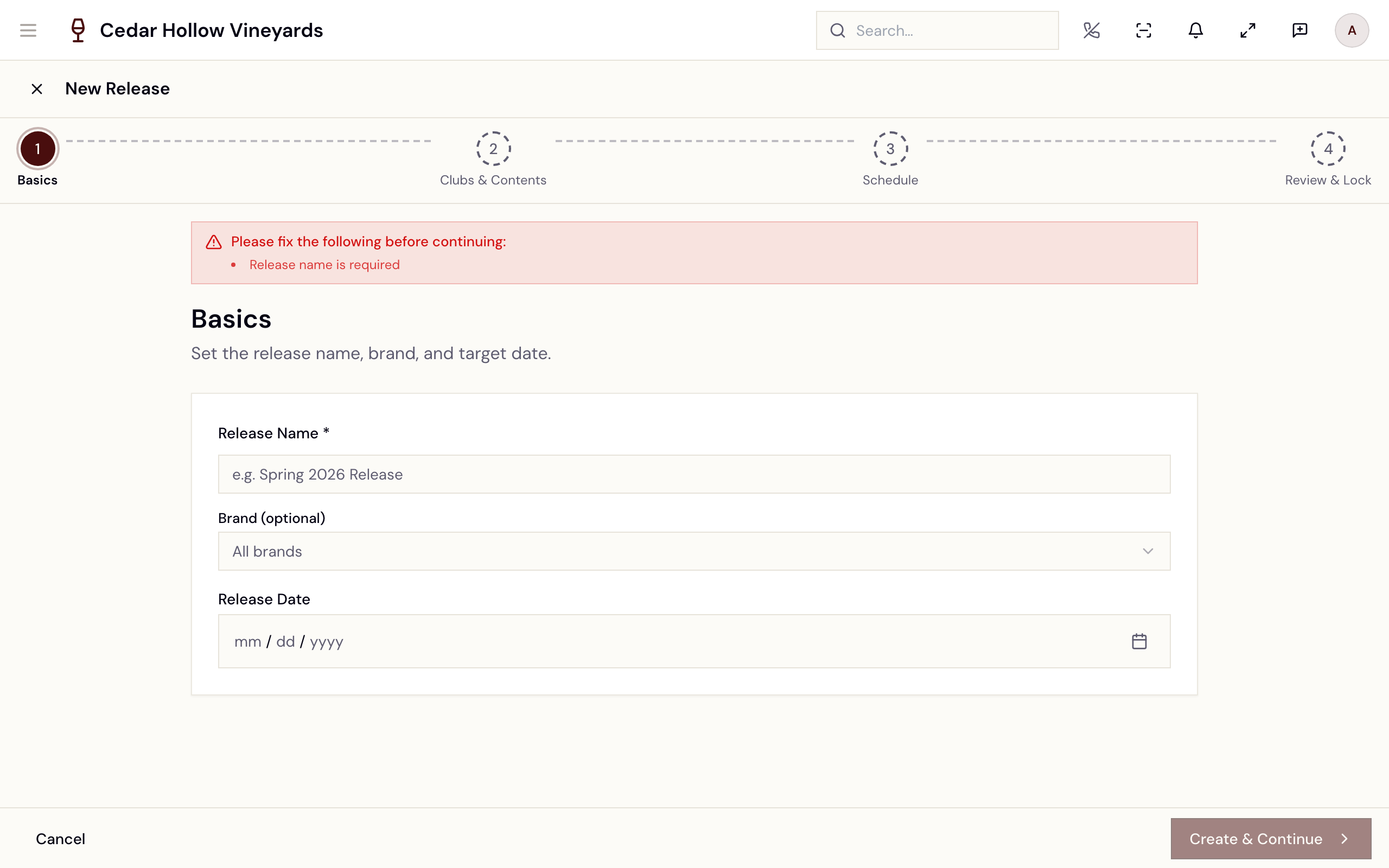
The release wizard — Basics, Clubs & Contents, Schedule, Review & Lock.
This picture shows an earlier version of this screen. The steps on this page are current.
- Basics — "Set the release name, brand, and target date." Release Name (required — "Release name is required"), optional Brand, and a Release Date.
- Clubs & Contents — "Who is it for, and what is in the box?" This
one step covers who receives the release and which wines go in it.
- Pick the Participating Club Types. Each club's card shows its bottles-per-release promise and its member count. If the club has tiers, choose which tiers this release goes to. A club with every tier unchecked is refused — "No tiers selected, so this club would receive nothing. Choose at least one, or remove the club above."
- Under Bottle Selection — "Select wines to include in this release." — search by name or SKU and build the Selected (N) list. "A collection will be automatically created for this release. Products you select will be added to it." Only products marked "Released to Club" appear; if there are none, the list says so and links to Open the Product Catalogue. Low- and out-of-stock wines are flagged, and a wine whose inventory policy blocks club sales shows the blocking policy.
- For each club, or each chosen tier, set Qty / Member per bottle. Where the tier has a promised bottle count, the box total is checked against it — for example "4 of 6 bottles — this box does not match what the tier is promised".
- The Required Inventory summary (Product / Required / Committed / Shortfall) totals the demand — quantity × members. Commit Inventory reserves the bottles — "Inventory committed" (reversible with Uncommit Inventory until the release is locked).
- Schedule — "When the release is announced, charged and shipped — and what the member hears at each point." Six dates: Announce Email, Reminder Email, SMS Notification, Charge Date, Ship Date, Follow-up Email. The wizard enforces their order ("Announce must be before Reminder", "Charge Date must be before Ship Date", and so on). The Add Notification card adds extra dated notifications, which are listed under Custom Notifications.
- Review & Lock — "Review all details before locking the release." Summary cards for Basics, Bottles, Clubs and Schedule, then Lock Release — "Locking this release will prevent most changes. Are you sure you want to proceed?" — toast "Release locked". The button stays disabled until inventory is committed. The hint beside it reads "Commit inventory on the Club Build step before locking." — that means the Clubs & Contents step.
Once locked, the release charges members automatically when its Charge Date arrives. A locked release with no Charge Date never charges on its own, so always set one on the Schedule step.
You can also start the run by hand. On a locked release, Begin Charging appears in the Review & Lock actions. It asks first — naming the release, how many members will be charged, and the date the run would otherwise have happened — and the confirm button reads Charge N members now. It is hidden during Emergency Edit, because a release you are editing is not one to bill.
The confirmation — member count and the date it would otherwise have run.
Two things worth knowing before you use it:
- It starts the run; it does not bill the cards in that instant. Every member is queued and the charge worker begins billing within a few minutes. Outcomes appear on the reconciliation report as each card is attempted.
- No total is shown, deliberately. Each member's price is worked out when the run starts, including club discounts. A figure added up beforehand would leave those out, and a wrong number on a screen that charges everyone is worse than no number.
Begin Charging only appears on a locked release — it is the one state the transition is allowed from.
After locking, changes require Emergency Edit — "You are editing a locked release. Changes will be audited." — with a mandatory audit note ("Audit note: why is this edit necessary?"). Cancel Release asks for a reason and releases the inventory holds (toast "Release cancelled"). It cannot be undone, and a reconciled release can no longer be cancelled.
Allocations
When a release is built, every eligible member of a participating club gets an allocation — their bottles in this release. The release detail lists them under Allocations (N) with Guest Name, Email, Tier, Status, and Created. Members with an open skip (set from the member drawer) are left out of the next release, and their skip clears automatically once it runs.
Member billing
On the Charge Date, Avero charges each allocated member's card on file. Every attempt is one of Pending, Succeeded, Failed, or Waived. Failures go straight into the dunning cycle — automatic retries on the schedule set at Dunning Policy (default: 4 total attempts at 0 / 3 / 7 / 14 days, then pause) — and land on the reconciliation page for the humans.
Reconcile a release
Once a release is charging (or reconciled), open
/admin/wine-club/releases/:id/reconciliation — Reconciliation:
[release name]. In any earlier state the page declines: "Reconciliation
is only available for releases in 'charging' or 'reconciled' state."
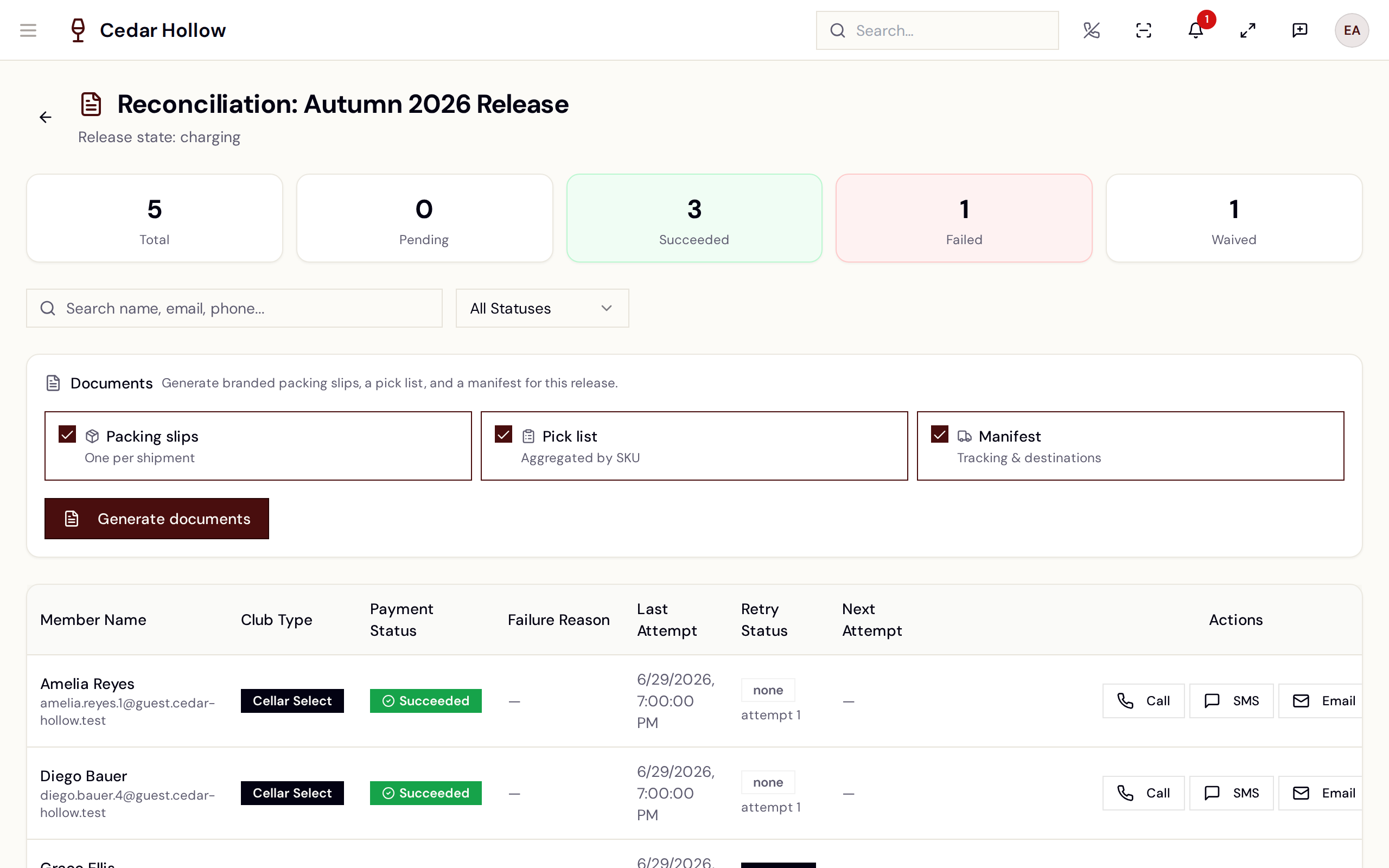
Reconciliation — summary tiles, filters, and per-member recovery actions.
This picture shows an earlier version of this screen. The steps on this page are current.
Five summary tiles — Total, Pending, Succeeded, Failed, Waived — sit at the top. Below them, What needs doing sorts the members into the work left to do: Shipped, not paid, Payment failed, Shipment issue, Waiting for pickup and Skipped, plus Everyone. Click one to filter the table. Each member sits in one bucket only — the most costly thing they need.
The table lists every member: Needs (the same bucket), Member
Name, Club Type, Payment Status, Failure Reason, Last
Attempt, Retry Status (pending, scheduled, exhausted,
skipped, or none), Next Attempt, and Actions. Search by
name, email, or phone; filter by status or club type. A Release
Documents panel generates the release paperwork (needs
wineclub.update).
Per-row actions
Three actions sit on the row itself, and the rest live behind the ⋯ menu at the end of it. The menu only lists what that row can actually use — a member who has already paid has no retries to skip and no dunning left to send, so those entries simply are not there.
On the row:
- Waive — write the charge off. Mark Payment as Waived confirms ("This action can be reversed.") — toast "Payment marked as waived". Only on unresolved payments.
- Call — Log Phone Contact shows the member's phone and stores your note ("Phone contact logged").
- Invoice — send the member an invoice for what they owe. The label reads Re-send once one has already gone out, so you can tell at a glance whether this member has been billed. It is disabled when the row has no order behind it yet: "No order exists for this row yet, so there is nothing to invoice from."
Behind ⋯, under Contact the member:
-
Send SMS and Send email — write a message and send it. Both open a compose box showing the number or address it will go to, and the send button stays disabled until you have typed something.
These queue the message rather than delivering it on the spot, and the toast says so: "SMS queued for delivery". What actually became of it shows on the row, under the Last Attempt column — SMS: delivered, SMS: sending, SMS: failed, or Call: logged. A failed one is red. If the member has no number or address on file the entry is still listed, greyed out, telling you which is missing.
Under Automated chase (unresolved payments only):
- Send first-attempt email, Send second-attempt email, Send on-hold (final) email — "Dunning email sent". Suppressed recipients are blocked: "Recipient is on the suppression list."
- Skip automatic retries / Resume automatic retries — take a row out of (or back into) the retry schedule — "The dunning worker will skip this row." Skipped rows show an amber "auto-retry off" marker.
There is no per-row "retry now" — retries run on the dunning schedule. To trigger recovery immediately, use the member drawer's Retry charge (resets failed charges to pending) or, at the tasting room, the POS Resolve actions.
Where fulfillment takes over
Once a member's charge succeeds, Avero automatically creates their club order and pushes it into the shipping pipeline — no manual step. From there:
- Pickups surface in the POS Pickup Queue for tasting-room handoff.
- Shipments are tracked on the Club Releases tab's Shipments view
(provider, tracking, carrier, status) and in the company-wide shipping
queue at
/admin/shipments(see Orders & fulfillment); warehouse fulfillment via FORT WMS is configured at/admin/integrations/fort, and DTC compliance at/admin/compliance.
Reference
| Control | Where | What it does |
|---|---|---|
| New release | Club Releases tab | Opens the four-step release wizard. |
| Commit Inventory | Clubs & Contents | Reserves the required bottles; Uncommit Inventory reverses. |
| Lock Release | Review & Lock step | Freezes the plan; charging runs itself on the Charge Date. |
| Emergency Edit | Review & Lock step | Audited edits to a locked release. |
| Cancel Release | Wizard | Cancels the plan (toast "Release cancelled"). |
| Waive | Reconciliation row | Writes off a member's failed charge (reversible). |
| Automated chase | Reconciliation row | Sends a first-attempt / second-attempt / on-hold email now. |
| Skip automatic retries | Reconciliation row | Removes a row from the automatic retry schedule. |
| What needs doing | Reconciliation | Filters the table to one kind of outstanding work. |
| Reconciliation | Release in charging | The per-member payment cleanup table. |
Troubleshooting
- "No products are currently marked as 'Released to Club'…" — flag the wines for club release in the catalogue first; the Bottle Selection list only shows released products.
- "Bottles: At least one product must be selected" / "Club Build: At least one club must be selected" — the Review step repeats each gap with a prefix. Both are fixed on the Clubs & Contents step.
- "… has no tiers selected — choose at least one, or remove the club" — a club is selected but none of its tiers are. Tick a tier or remove the club.
- "Announce must be before Reminder" (and friends) — the Schedule dates must run in order: announce → reminder → charge → ship → follow-up.
- Lock Release is disabled — commit inventory on the Clubs & Contents step first.
- "Reconciliation not available" — the release hasn't started charging yet; reconciliation opens once the Charge Date runs.
- A locked release never charged — check the Schedule step: a locked plan without a Charge Date is never charged automatically.
- "Release plan not found" — the plan was deleted or the link is stale; Return to Releases.
Related
- Set up your wine club — clubs, tiers, members, the POS pickup queue, and the dunning policy.
- Payments & refunds — refunds outside the club billing cycle.
- Reports — sales and club reporting.